[Product Information] Wi-Fi 7 support
Answer
For Wi-Fi 7 Support, the network environment should meet the following requirements:
I. Check if your laptop is equipped with Wi-Fi 7 network adapters:
a. Check the specifications on the MSI webstie.
b. Check in the Device Manager:
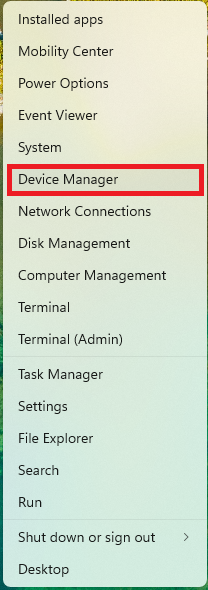
i. Right-click Start and go to Device Manager.
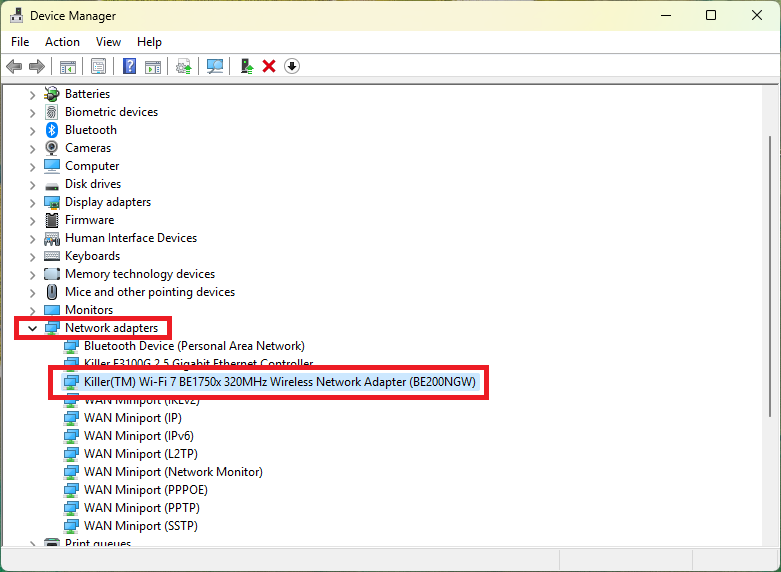
ii. Find Network adaptor.
Laptops supporting Wi-Fi 7 will be equipped with Wi-Fi 7 network adaptor.
II. Update the operating system to Win 11 24H2
To update to Windows 11 24H2, please run a Windows Update, or create a Media creation tool and refer to FAQ-2410 to install Windows 11 24H2.
III. Install the WLAN drivers supporting Wi-Fi 7.
For the Intel network adapter, please refer to Intel WLAN generic driver.
For the AMD and Qualcomm network adapter, please refer to the support page of your model on the MSI website.
IV. Use routers supporting Wi-Fi 7.
Models
- Raider GE68HX 13VI
- Raider GE78HX SmartTP 13VG
- Stealth 18 AI Studio A1VGG
- Vector 17 HX A14VFG
- Prestige 13 AI Evo A1MG
- Prestige 14 AI Studio C1U
- Prestige 16 AI Studio B1U
- Creator 16 AI Studio A1VIG
- CreatorPro X18 HX A14VKSG
- Raider GE78HX 13VH
- Prestige 16 AI Evo B1MG
- Raider GE68 HX 14VGG
- Vector 16 HX A14VFG
- Vector 17 HX A14VGG
- Titan 18 HX A14V
- Creator Z17 HX Studio - A14V
- Prestige 16 AI Studio B1VFG
- Raider 18 HX A14VGG
- Stealth 18 Mercedes-AMG Motorsport A1V
- Summit E16 AI Studio A1VETG
- Raider GE68 HX 14V
- Stealth 18 AI Studio A1VFG
- Titan 18 HX A14VIG
- Vector 17 HX A13VIG
- Prestige 13 AI Evo A1M
- Raider GE68 HX 13V
- Vector 16 HX A13VIG
- Raider GE68HX 13VG
- Raider GE78 HX 14VGG
- Summit E16 AI Evo - A1M
- CreatorPro 16 AI Studio - A1V
- CreatorPro X18 HX A14VMG
- Raider GE68HX 13VF
- Stealth 18 AI Studio A1VHG
- Titan 18 HX A14VHG
- Prestige 14 AI Studio C1VFG
- Raider GE78HX 13VG
- Raider GE78HX 13VI
- Stealth 18 AI Studio A1V
- Prestige 16 AI Studio B1VEG
- Stealth 16 AI Studio A1VGG
- Summit E13 AI Evo - A1M
- Vector 16 HX A13VHG
- Vector 17 HX A13V
- Stealth 16 AI Studio A1V
- Prestige 14 AI Evo C1MG
- Summit E16 AI Studio - A1V
- Vector 16 HX A13V
- Raider GE78 HX 13V
- Summit E13 AI Evo A1MTG
- Vector 16 HX A14V
- Creator Z17 HX Studio A14VFT
- Prestige 14 AI Studio C1UDXG
- Raider GE78 HX 14VIG
- Summit E16 AI Studio A1VFTG
- Creator 16 AI Studio - A1V
- Prestige 16 AI Evo B1M
- Prestige 16 AI Studio B1UDXG
- Prestige 16 AI Studio B1V
- Raider GE68HX 13VH
- Summit E16 AI Evo A1MTG
- CreatorPro 16 AI Studio A1VJG
- Stealth 16 AI Studio A1VFG
- Stealth 14 AI Studio A1V
- Vector 16 HX A14VHG
- CreatorPro 16 AI Studio A1VMG
- Prestige 14 AI Studio C1VEG
- Vector 16 HX A14VIG
- Creator Z17 HX Studio A14VET
- Prestige 16 AI Studio B1VGG
- Vector 17 HX A14VIG
- Vector 16 HX A14VGG
- Vector 17 HX A14VHG
- Creator 16 AI Studio A1VHG
- Stealth 14 AI Studio A1VFG
- Creator Z17 HX Studio A14VGT
- Raider GE68 HX 14VIG
- Vector 17 HX A13VHG
- Creator Z17 HX Studio - A13V
- Raider 18 HX A14V
- Raider GE68 HX 14VFG
- Raider GE78 HX Smart Touchpad 13V
- Stealth 14 AI Studio A1VGG
- Stealth 18 MercedesAMG A1VHG
- Vector 17 HX A14V
- Prestige 14 AI Studio C1V
- Raider GE68 HX 14VHG
- Stealth 16 AI Studio A1VIG
- CreatorPro 16 AI Studio A1VKG
- CreatorPro X18 HX - A14V
- Prestige 14 AI Evo C1M
- Raider 18 HX A14VHG
- Raider GE78 HX 14V
- Raider GE78 HX 14VHG
- Stealth 14 AI Studio A1VEG
- Stealth 16 AI Studio A1VHG
- Stealth 18 AI Studio A1VIG
- Raider 18 HX A14VIG
- Raider GE78 HX 14VFG