When moving the cursor by using touch pad, the distance of the movement seems not long enough. It took many slides to make the cursor move from the left side to the right side. How to set up the touch pad to resolve the problem?
LastUpdate : Tue, 20 Jan 2015
Answer
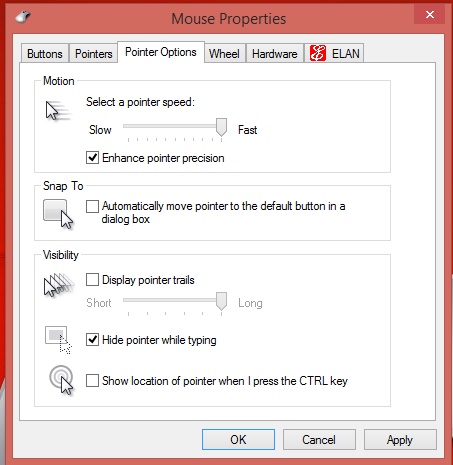
Please open “Control Panel >> Mouse” option, and select “Pointer Options” page. Then set the pointer speed to the fastest and apply the setting.
Reference
Models
- GS60 2PE Ghost Pro 3K Edition
- GS60 2PC Ghost 3K Edition
- GS70 STEALTH
- GS70 2PE Stealth Pro
- GS60 2PC Ghost Gold Edition
- GS60 2PM
- GS60 2PC Ghost
- GS60 2PE Ghost Pro
- GS60 2PL Ghost
- GS70 2PC Stealth
- GS60 2PE Ghost Pro 3K Gold Edition