Microsoft Products & Information
The following notices relate to Microsoft® products that may be provided as part of your system purchase.
Windows Operating System
- Software license and warranty: You must accept the enclosed software License and Warranty Terms (microsoft.com/useterms).
- Language Packs: Computers preinstalled with Windows 11 Home Single Language or Windows 11 Home Chinese Language Editions will not support the installation of additional language packs.
- High-speed internet and Microsoft account Requirement: Requires high-speed internet and Microsoft account. Set-up may require significant download; ISP fees apply.
- Updates: Windows 11 is automatically updated, which is always enabled. ISP fees may apply. Additional storage and/or hardware requirements may apply over time for updates. See https://www.microsoft.com/en-us/windows/windows-11-specifications for more details.
- Storage Capacity:The operating system software and updates use significant storage space; user's storage capacity will be less. For additional information see https://www.microsoft.com/en-us/windows/windows-10-specifications for Windows 10 or https://www.microsoft.com/en-us/windows/windows-11-specifications for Windows 11.
Features
- Some features require camera, microphone, speakers and/or advanced hardware.
- Some features and functionality of Windows that are dependent on electronic transactions may not be supported in Iran. Examples include, but are not limited to, apps & games and Xbox Music & Video purchases available in the Microsoft Store.
- Skype Translator requires Skype for Windows Desktop. See https://support.skype.com/en/faq/FA34543/what-languages-are-available-in-skype-translator for supported languages.
- Windows in S mode works exclusively with Microsoft-verified apps found in the Microsoft Store within Windows and accessories that are compatible with Windows in S mode. A one-way switch out of S mode is available. Learn more at Windows.com/SmodeFAQ.
- Windows 11 :
- Battery life varies significantly by device and with settings, usage and other factors. See aka.ms/w11claims.
- Windows can back up files, settings, and apps from PCs running Windows 10 and higher. Restore is available on Windows 11, version 22H2 and higher. Geographic restrictions may apply.
- Requires Microsoft account. Up to 5 GB of Microsoft Storage is included. Data transfers exceeding 5 GB require an active Microsoft subscription or trial.
- When you open apps for the first time on your new Windows 11 PC, some will reinstall when you first open them. Other apps may require you to reinstall them manually from the original app provider.
- Windows 11 Pro :
- Results in comparison to Windows 10 PCs. Windows 11 Survey Report, Techaisle, September 2024. Report commissioned by Microsoft.
- Microsoft commissioned study delivered by Forrester Consulting The Total Economic Impact™ of Windows 11 Pro Devices, December 2022. Note, quantified benefits reflect results over three years combined into a single composite organization that generates $1 billion in annual revenue, has 2,000 employees, refreshes hardware on a four-year cycle, and migrates the entirety of its workforce to Windows 11 devices.
- Results in comparison to Windows 10 PCs. Improve your day-to-day experience with Windows 11 Pro laptops, Principled Technologies, April 2023. Report commissioned by Microsoft.
- Sold separately.
- Battery life varies based on settings, usage, device and other factors.
- Copilot+ PC experiences vary by device and region and may require updates continuing to roll out through 2025; timing varies. See Copilot+ PCs FAQs.
Copilot
- For devices with the
 key Copilot key feature availability varies by market, see aka.ms/Keysupport
Copilot+ PC
Copilot+ PC experiences vary by device and region and may require updates continuing to roll out through 2025; timing varies. See aka.ms/copilotpluspcs
- Consumer :
- Based on Steam Store listings as of 5/8/25; availability varies by market and over time.
- Battery life varies significantly based on device, settings, usage, and other factors. See aka.ms/cpclaims
- Image actions now available across devices; other actions vary by device region, language and character set. Subscription required for some actions. See aka.ms/copilotpluspcs
- Requires Windows Hello Enhanced Sign-in Security. Optimized for select languages (English, Chinese (Simplified), French, German, Japanese, and Spanish). Content-based and storage limitations apply. See aka.ms/copilotpluspcs
- Works with specific text, image, and document formats only; optimized for select languages (English, Chinese (Simplified), French, German, Japanese, and Spanish). See aka.ms/copilotpluspcs
- Windows Hello facial recognition available on select Copilot+ PCs.
- Commercial :
- Copilot+ PC experiences vary by device and region and may require updates continuing to roll out through 2025; timing varies. See Copilot+ PCs FAQs.
- Battery life varies significantly by device and with settings, usage and other factors. See Copilot+ PC claims.
- Click to Do (preview) available image and text actions vary by device, region, language, and character set. Subscription required for some actions. Click to Do coming to the European Economic Area later in 2025. See Copilot+ PC FAQs.
- Recall (preview) requires Windows Hello Enhanced Sign-in Security. Coming to the European Economic Area later in 2025. Optimized for select languages [English, Chinese (Simplified), French, German, Japanese, and Spanish]. Content-based and storage limitations apply. Enterprise license required for some policy-enabled management controls. See Copilot+ PC FAQs.
- Copilot+ PC Features Update :
- Live Captions : Currently supports translation for video and audio subtitles into English from 40+ languages. See aka.ms/copilotpluspcs
- Cocreator : Optimized for English text prompts. Requires Microsoft account and internet connection to access cloud services that help ensure the responsible use of AI. *Some Copilot+ PC experiences require free updates continuing to roll out through early 2025. Timing varies by device and region. See aka.ms/copilotpluspcs
- Recall : Available starting early 2025 in most markets; rolling out to the European Economic Area later this year. Optimiz ed for select languages (English, Chinese (Simplified), French, German, Japanese, and Spanish). Content-based and storage limitations apply. Requires Windows Hello Enhanced Sign-in Security. See aka.ms/copilotpluspc
- Click to Do (Preview) - Text action : Available on Copilot+ PCs with Snapdragon® X Series processors starting early 2025 and on other devices starting mid-2025. Text actions available across markets in select character sets. See aka.ms/copilotpluspcs
- Photos- Image Creator : Optimized for English text prompts. Requires Microsoft account and internet connection to access cloud services that help ensure the responsible use of AI. Learn more
- Improved Windows Search : Available on Copilot+ PCs with Snapdragon® X Series processors starting early 2025 and on other devices starting mid-2025. Works with specific text, image, and document formats only; optimized for select languages (English, Chinese (Simplified), French, German, Japanese, and Spanish). See aka.ms/copilotpluspcs
Windows 10 End of Service
- Microsoft support for Windows 10 will end on October 14, 2025.
- After the End of Support (EOS) date, Microsoft will no longer provide bug fixes for issues, security fixes for vulnerabilities, or technical support for problems that might occur. For more detailed information, please visit the link as shown below: https://www.microsoft.com/en-us/windows/end-of-support
- Extended Support Program (ESU program) :
- The Extended Security Updates (ESU) program provides an option to help a customer’s Windows 10 PC stay protected while they transition to a new Windows 11 PC post Windows 10 End of Service.
- Enroll in Extended Security Updatesto help keep your PC safe and secure until October 2026.
- Customers who opt-in to receive Extended Security Updates will be presented with three options :
- Partial back up PC setting to move to a new Windows 11 PC: Back up PC Settings, Apps and Credentials to the cloud
- Redeem 1,000 Bing Rewards points: Redeem 1,000 Microsoft Rewards points
- Purchase License: $30
- For more detailed information, visit the link as shown below: https://learn.microsoft.com/en-us/windows/whats-new/extended-security-updates.
Audio Visual (AV) and Telecommunication Technologies for Windows Products
- H.264/AVC Visual Standard and the VC-1 Video Standard :This Product is licensed under the AVC and the VC-1 patent portfolio licenses for the personal and non-commercial use of a consumer to (i) encode video in compliance with the above standards (“Video Standards”) and/or (ii) decode AVC and VC-1 that was encoded by a consumer engaged in personal and non-commercial activity or was obtained from a video provider licensed to provide such video. None of the licenses extend to any other product regardless of whether such product is included with this product in a single article. No license is granted or will be implied for any other use. Additional information may be obtained from MPEG LA, LLC. See www.mpegla.com.
- Dolby DD / DD+ Codecs : This Agreement does not, and the Windows Products do not, convey any right to use the Dolby technology portion of the foregoing Windows products or to make, reproduce, or sell the Dolby portion of such Windows products outside of the location of delivery under this Agreement. This Agreement does not grant and does not have the right to grant any rights to Dolby patents for any use of the Dolby portion of the product, or making or selling of such Windows products outside of the delivery location. A list of relevant patents may be obtained from Dolby Laboratories, Inc. This Agreement does not grant and does not have the right to grant any rights to any Dolby copyrights, including the right to reproduce or distribute any portions of the Windows Products that include Dolby intellectual property. Licenses for these activities may be obtained from Dolby.
Microsoft Office Products and Applications
- Microsoft Account : Device purchased may include digital offers. To redeem, a Microsoft account and Windows activation are required. Offers may also need to be redeemed within a specified time frame.
- Any version of Microsoft Office or Microsoft 365 included with this device is region-locked and can only be activated in the country or region where it was originally purchased.
- To learn whether the MSI devices purchased contain Microsoft Office or Microsoft 365 products, please refer to the product specification details. The subscription availability may vary by model and by country.
- Microsoft 365 licenses are not included with resold or 'Open Box' devices unless the seller has confirmed that the Microsoft 365 license has not been previously activated on the device.
Commercial Use Rights
- Microsoft 365 Personal or Microsoft 365 Family do not include commercial use rights. Users must possess a qualifying Microsoft 365 license that explicitly grants rights for commercial use in order to engage in business-related activities. The use restrictions are described in the Microsoft 365 License Terms. Users should refer to those License Terms for the commercial use rights limitations.
Support and Sublicensing
- Microsoft is the licensor of the software. Microsoft is responsible for all support of the software.
- Microsoft is the licensor of Microsoft Office and Microsoft 365 and not MSI. Microsoft will be responsible for any support of the Microsoft Office and Microsoft 365 Product, not MSI.
Contact Microsoft Customer Service & Support (CSS)
Contact Support Link: https://support.microsoft.com/en-us/contactus/
- Log in with your Microsoft Account (MSA)
- Click “Get support” link
- On the following screen, type in “CSS” and click “Get Help”, then Click “Contact Support” button
- On the Products and Services, drop down select “Microsoft 365 and Office” or “Windows” depending on issue type and on the Category drop down select “Technical Support”. Click Confirm button
- Click “Chat with a support agent"
Activation
- Expiration notice. The End User needs to activate their Microsoft 365 subscription within 180 days of Windows activation. The enablement for Microsoft 365 may expire after 4 years of Microsoft’s acceptance of the PBR, at which time the End User may need to contact Microsoft customer support to activate.
- A 3-month Microsoft 365 Personal subscription may be included with your product purchase. This 3-month Microsoft 365 Personal subscription must be activated within 180 days of Windows activation date. Payment instrument required at the time of redemption. After your first 3-months, you will be automatically charged yearly at the then current price (subject to change with notice). Turn off recurring billing to stop future charges at least 2 days before the next billing date at account.microsoft.com (Services & Subscriptions tab); your subscription will continue through the end of the then current term. Credit card required.
- A 1-year Microsoft 365 Personal subscription may be included with your product purchase. This 1-year Microsoft 365 Personal subscription must be activated within 180 days of Windows activation date. Payment instrument required at the time of redemption. After your first year, you will be automatically charged yearly at the then current price (subject to change with notice). Turn off recurring billing to stop future charges at least 2 days before the next billing date at account.microsoft.com (Services & Subscriptions tab); your subscription will continue through the end of the then current term. Credit card required.
- A 1-year Microsoft 365 Basic subscription may be included with your product purchase. This 1-year Microsoft 365 Basic subscription must be activated within 180 days of Windows activation date. Payment instrument required at the time of redemption. After your first year, you will be automatically charged yearly at the then current price (subject to change with notice). Turn off recurring billing to stop future charges at least 2 days before the next billing date at account.microsoft.com (Services & Subscriptions tab); your subscription will continue through the end of the then current term. Credit card required.
- A 24-month Microsoft 365 Personal subscription may be included with your product purchase in Japan. Users are allowed to enjoy a free 3-month trial of Microsoft 365 Personal. After the 3-month trial, users can either choose to become a Microsoft 365 Personal subscriber (continue to use 21 months) or revert to Office Home & Business 2024 (permanent subscription). For users who choose to become a Microsoft 365 Personal subscriber, after the total 24 month subscription (the 3-month trial plus 21 months afterwards), you will be automatically charged yearly at the then current price (subject to change with notice). Turn off recurring billing to stop future charges at least 2 days before the next billing date at account.microsoft.com (Services & Subscriptions tab); your subscription will continue through the end of the then current term. Credit card required. For users who choose to revert to Office Home & Business 2024 after the 3-month trial, your office plan will be switched to Office Home & Business 2024 permanent subscription.
- M365 Basic in Japan/PIPC is Payment Instrument (PI) Required versions. Payment instrument required to activate subscription; must activate within 180 days of Windows activation. After your first 12 months, you will be charged yearly at the then current price (subject to change with notice). Turn off recurring billing to stop future charges by visiting account.microsoft.com at least two days before the next billing date.
- M365 Basic in APAC and India is Payment Instrument (PI) Optional versions. 12-months of Microsoft 365 Basic subscription included. Activation required within 180 days of Windows activation date.
- If your product does not include an Microsoft Office or Microsoft 365 license, your system will come with a one-month trial of Microsoft 365 for new customers. A credit card is required for activation. Unless canceled, subscription fees will apply after the trial period ends.
- Microsoft Office Home and Business 2021, Microsoft Office Professional 2021 and Microsoft Office Home & Business 2024 are intended for home offices or small businesses and require a Microsoft Account (MSA) for activation, which has a technical restriction to no more than twenty-five (25) activations. A Microsoft Account is required to activate each copy of this product.
How to Redeem Microsoft Office / Microsoft 365
- Steps: Microsoft Office SOP file download
- Steps: Microsoft Office 365 SOP file download
- Support and Sublicensing : Microsoft is the licensor of the software. Microsoft is responsible for all support of the software.
Device Repair Notification
- Before sending the device to the MSI RMA center for hardware repair, please ensure that all digital attached products (including but not limited to Xbox Game Pass and Microsoft Office/Microsoft 365) have been redeemed to your Microsoft (MSA) account. This will help prevent the loss of any included offers. After the repair is completed, you can re-download the subscription products from your MSA account to the device.
- If you encounter any issues re-downloading the subscription products from your MSA account to the device, please contact Microsoft Customer Service & Support (CSS) for assistance:
Contact Support Link: https://support.microsoft.com/en-us/contactus/- Log in with your Microsoft Account (MSA)
- Click “Get support” link
- On the following screen, type in “CSS” and click “Get Help”, then Click “Contact Support” button
- On the Products and Services, drop down select “Microsoft 365 and Office” or “Windows” depending on issue type and on the Category drop down select “Technical Support”. Click Confirm button
- Click “Chat with a support agent"
- Microsoft is the licensor of the software. Microsoft is responsible for all support of the software.
Microsoft Xbox GamePass
- Game catalog varies over time. See xbox.com/gamepass.
- Offers may vary by region and may only be available for a certain time or subject to change without prior notice and other limitations. Check terms and conditions at https://aka.ms/XboxRewardsTerms.
- The Microsoft Store is only operated in certain countries. A list of available countries is provided at https://docs.microsoft.com/en-us/windows/uwp/publish/define-pricing-and-market-selection#windows-store-consumer-markets.
- To learn whether the MSI devices purchased offer free Xbox PC Game Pass subscription, please refer to the product specification details. The subscription availability may vary by model and by country.
- MSI reserves the discretionary right to vary, delete, or add to any of these Terms & Conditions. By participating in this Xbox Game Pass Offer, including submitting required information, participants agree to be bound by these Terms and Conditions.
- Xbox GamePass product is not included with resold or 'Open Box' devices unless the seller has confirmed that the Xbox GamePass license has not been previously activated on the device.
Games Content
- The Product may contain programs and/or content developed by third parties. Neither Microsoft nor its suppliers guarantee that the programs and/or content are suitable for minors.
Support and Sublicensing
- Microsoft is the licensor of this software. Microsoft will be responsible for any support of the Product.
- Microsoft is the licensor of the Product and not MSI. Microsoft will be responsible for any support of the Produc, not MSI.
Contact Microsoft Customer Service & Support (CSS)
Contact Support Link: https://support.microsoft.com/en-us/contactus/
- Log in with your Microsoft Account (MSA)
- Click “Get support” link
- On the following screen, type in “CSS” and click “Get Help”, then Click “Contact Support” button
- On the Products and Services, drop down select “Microsoft 365 and Office” or “Windows” depending on issue type and on the Category drop down select “Technical Support”. Click Confirm button
- Click “Chat with a support agent"
Activation Requirements
- Requires Windows 10/11, version 22H2 or higher. See system requirements.
- Xbox Game Pass Geographies & Activation: The Xbox Digital offers may permit activation only in the Geographies as specified on https://www.xbox.com/regions.
- Claim within 30 days of device activation. New and eligible returning members only. Valid payment method required. Subscription continues automatically at regular monthly price unless cancelled. Subject to xbox.com/subscriptionterms. Benefits vary by Xbox Game Pass plan. Game library varies over time, by region, device, and Xbox Game Pass plan. xbox.com/gamepass. Ingame benefits vary by game, region, and over time. Game must be installed to access in-game benefits. Xbox Cloud Gaming requires an Xbox Game Pass subscription and supported device (both sold separately). Cloud playable games not included with Xbox Game Pass are sold separately, and may be made available with Xbox Game Pass in the future. See library: (xbox.com/play).
- Using Game Pass on this PC requires switching out of Windows S mode. See https://aka.ms/s-mode
- If the product contains an Xbox Game Pass subscription, redemption of these offers requires a Microsoft Account (MSA), Windows activation and may require redemption within a specific amount of time.
- If the product contains an Xbox Game Pass subscription, activation is required and may require redemption within a specific amount of time. Credit card required. Unless you cancel, you will be charged the current subscription rate when the initial subscription period ends. Cancel at account.microsoft.com/services. Game catalog varies over time, by region, and by device (xbox.com/gamepass). Subscription continues automatically at regular monthly price unless cancelled. A conversion ratio applies for Xbox Game Pass Ultimate users. Limit: 1 per person/account. Subject to xbox.com/subscriptionterms. Terms and exclusions apply. All rights reserved. xbox.com/pcgamepass, ea.com/ea-play/terms. Learn more about supported regions at xbox.com/regions.
- Use your active PC Game Pass membership to play PC games on Windows 10/11 PC (excludes Windows 10 in S mode and ARM devices). App download, Windows update(s), and storage required (xbox.com/pcgamepass). System requirements vary by game; performance scales with higher end systems. Playing games on the Xbox app for PC may require switching out of Windows S mode. Notice before purchase of add-ons, DLC, consumables, virtual currency, subscriptions, or other items (sold separately): If your membership terminates or a game is removed from the catalog, you must reactivate your membership or buy the game separately to continue using these items. Requires download(s) (significant storage, broadband, and ISP fees apply) and Microsoft account. May require additional hardware and subscriptions. Age restrictions apply. Service, features, and requirements may change or be retired. Subject to the Microsoft Services Agreement (microsoft.com/msa).
- Xbox Game Pass subscriptions may not be stacked. Only one Xbox Game Pass Digital Attach Product may be Bundled with an Eligible Device.
How to Redeem Xbox Game Pass
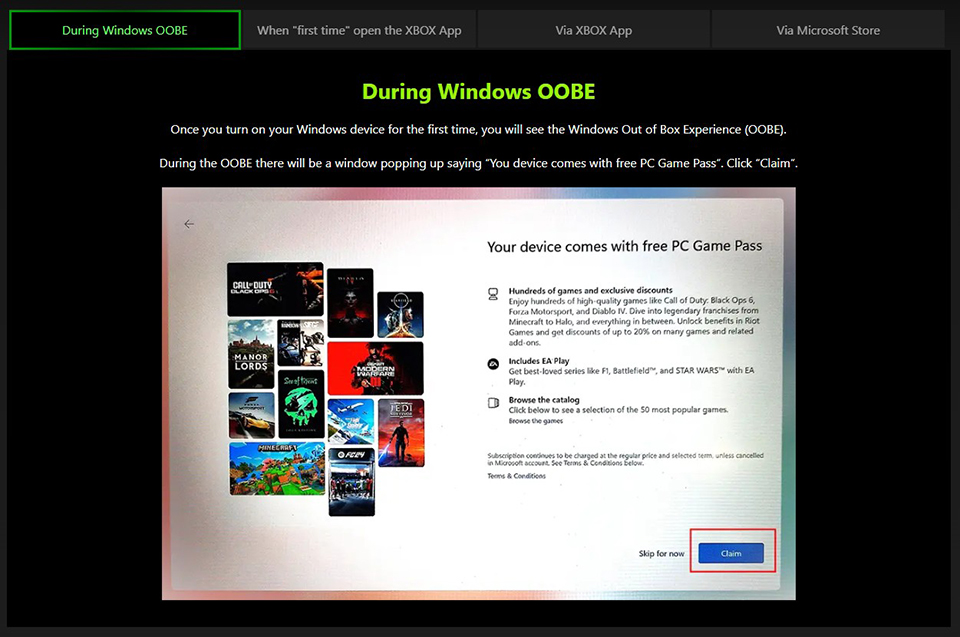
- Steps : Please follow the redeem steps of the “How to Redeem” section on https://www.msi.com/Landing/xbox_game_pass/nb
- Support and Sublicensing : Microsoft is the licensor of the software. Microsoft is responsible for all support of the software.
Device Repair Notification
- Before sending the device to the MSI RMA center for hardware repair, please ensure that all digital attached products (including but not limited to Xbox Game Pass and Microsoft Office/Microsoft 365) have been redeemed to your Microsoft (MSA) account. This will help prevent the loss of any included offers. After the repair is completed, you can re-download the subscription products from your MSA account to the device.
- If you encounter any issues re-downloading the subscription products from your MSA account to the device, please contact Microsoft Customer Service & Support (CSS) for assistance:
Contact Support Link: https://support.microsoft.com/en-us/contactus/- Log in with your Microsoft Account (MSA)
- Click “Get support” link
- On the following screen, type in “CSS” and click “Get Help”, then Click “Contact Support” button
- On the Products and Services, drop down select “Microsoft 365 and Office” or “Windows” depending on issue type and on the Category drop down select “Technical Support”. Click Confirm button
- Click “Chat with a support agent"
- Microsoft is the licensor of the software. Microsoft is responsible for all support of the software.