The Right Display for Every Role: MSI PRO Monitors for Education
Monitors
Schools and universities don't have one type of user. They have teachers managing lesson plans before the first bell, students working through research assignments, IT administrators keeping everything running, and creative faculty producing video content for online courses. A single monitor recommendation doesn't serve all of them — and that's exactly the problem MSI PRO monitors are built to solve.
The MSI PRO MP273W E14A and MSI PRO MAX 271UPXW12G were designed from different starting points, for different users. Together they form a complete answer to the full range of display needs across a school, college, or university campus.
The MSI PRO MP273W E14A and MSI PRO MAX 271UPXW12G were designed from different starting points, for different users. Together they form a complete answer to the full range of display needs across a school, college, or university campus.
Two Monitors. Two Roles. One Ecosystem.
The education environment places unique demands on display hardware. Monitors need to handle all-day use without causing eye strain, hold up in shared workspaces, integrate with a wide variety of devices, and in some cases deliver the kind of visual performance that professional creative work requires.
MSI's PRO monitor line approaches this with a clear philosophy: match the display to the role, not the other way around. The PRO MP273W E14A covers everyday classroom and office productivity. The PRO MAX 271UPXW12G steps up for educators and professionals who need more. Between the two, every role on campus has an answer.
MSI's PRO monitor line approaches this with a clear philosophy: match the display to the role, not the other way around. The PRO MP273W E14A covers everyday classroom and office productivity. The PRO MAX 271UPXW12G steps up for educators and professionals who need more. Between the two, every role on campus has an answer.
MSI PRO MP273W E14A: Built for the Classroom and the Office
The PRO MP273W E14A is MSI's answer to the most common display need in education: a reliable, comfortable, all-day monitor that works for everyone and causes problems for no one.
A Panel Designed for All-Day Use
The PRO MP273W E14A uses a 27-inch IPS panel at 1920x1080 (FHD) resolution with 178° horizontal and vertical viewing angles. For shared spaces — a teacher's workstation, a student computer lab, an administrator's desk — wide viewing angles mean consistent image quality regardless of where you're sitting relative to the screen.
At 144Hz with Adaptive-Sync, it's smooth and responsive far beyond what typical office monitors deliver. With a 1ms MPRT response time, on-screen motion during presentations, video playback, and interactive classroom content stays crisp and clear.
Eye Care That Matters for Long School Days
Teachers and students spend hours in front of screens every day. The PRO MP273W E14A carries MSI's EyesErgo certification — an eye care solution designed with ergonomics in mind, combining display adjustments that reduce fatigue during extended use.
The built-in Eye-Q Check feature reminds users to take breaks after prolonged screen time — a genuinely useful addition in educational settings where screen wellness is increasingly part of the conversation.
Plug-and-Play Simplicity for Shared Environments
For IT teams managing monitors across a campus, simplicity matters. The PRO MP273W E14A connects via HDMI 2.0, DisplayPort 1.2a, and D-Sub (VGA) — covering legacy and modern connections alike without requiring adapters or compatibility workarounds.
Built-in 3W x2 speakers eliminate the need for separate audio equipment in classrooms and small conference rooms. VESA mount support (100x100mm) makes wall mounting straightforward, and MSI Power Link lets the monitor power a connected desktop PC, reducing cable complexity at the workstation level. The accessory slot design lets teachers dock an MSI Pen or smartphone directly in the monitor stand — keeping the workspace organized and within reach during class.
A Panel Designed for All-Day Use
The PRO MP273W E14A uses a 27-inch IPS panel at 1920x1080 (FHD) resolution with 178° horizontal and vertical viewing angles. For shared spaces — a teacher's workstation, a student computer lab, an administrator's desk — wide viewing angles mean consistent image quality regardless of where you're sitting relative to the screen.
At 144Hz with Adaptive-Sync, it's smooth and responsive far beyond what typical office monitors deliver. With a 1ms MPRT response time, on-screen motion during presentations, video playback, and interactive classroom content stays crisp and clear.
Eye Care That Matters for Long School Days
Teachers and students spend hours in front of screens every day. The PRO MP273W E14A carries MSI's EyesErgo certification — an eye care solution designed with ergonomics in mind, combining display adjustments that reduce fatigue during extended use.
The built-in Eye-Q Check feature reminds users to take breaks after prolonged screen time — a genuinely useful addition in educational settings where screen wellness is increasingly part of the conversation.
Plug-and-Play Simplicity for Shared Environments
For IT teams managing monitors across a campus, simplicity matters. The PRO MP273W E14A connects via HDMI 2.0, DisplayPort 1.2a, and D-Sub (VGA) — covering legacy and modern connections alike without requiring adapters or compatibility workarounds.
Built-in 3W x2 speakers eliminate the need for separate audio equipment in classrooms and small conference rooms. VESA mount support (100x100mm) makes wall mounting straightforward, and MSI Power Link lets the monitor power a connected desktop PC, reducing cable complexity at the workstation level. The accessory slot design lets teachers dock an MSI Pen or smartphone directly in the monitor stand — keeping the workspace organized and within reach during class.
MSI PRO MAX 271UPXW12G: For Educators Who Need More
Not every role in education is a standard office use case. Creative faculty producing course videos, department heads running dual-device workflows, researchers working with high-fidelity visual data, and Mac-first educators who expect their display to feel native — these users need something the MP273W E14A isn't designed to deliver.
That's where the PRO MAX 271UPXW12G comes in.
4th-Gen QD-OLED: A Fundamentally Different Visual Experience
The PRO MAX is built on a 4th-generation QD-OLED panel — a proven, mature iteration of the technology delivering strong peak brightness, color volume, and long-term panel stability for professional use. At 3840x2160 (4K UHD) and 120Hz, with a 0.03ms GtG response time and 1,500,000:1 contrast ratio, it renders visual content with a depth and accuracy that IPS panels fundamentally cannot match.
For educators creating video content, editing photography for course materials, or presenting work that demands color fidelity, the PRO MAX delivers 99% DCI-P3 and 97.5% Adobe RGB coverage — professional-grade color accuracy that holds up under scrutiny.
Built for MacBook-First Educators
Mac is no longer the minority device in education. In North America, 71% of higher education students prefer or use Macs* — and the faculty workstations serving them are increasingly Mac-first too.
The PRO MAX was designed with this in mind — making it the first MSI monitor purpose-built for macOS users. M-Color Mode syncs the monitor's color output with your connected macOS device with a single hotkey press — no manual calibration needed. 166 PPI with macOS HiDPI support means text, UI elements, and visual content render with retina-class sharpness. MSI Monitor Control Center, available on the Mac App Store, handles all display settings natively. And a single 98W USB-C cable carries power, DisplayPort video, data, and firmware updates simultaneously — keeping the desk clean and the workflow uninterrupted.
All-Day OLED Protection Built In
For professional users spending full days at the PRO MAX, burn-in is a legitimate concern. The PRO MAX's exclusive AI Care Sensor (OLED Care 3.0) uses proximity detection to automatically dim the panel when you step away — active, intelligent burn-in protection that runs without any manual setup.
VisiClarity AGLR coating eliminates ambient reflections in bright office and classroom environments — a meaningful differentiator from competing QD-OLED monitors that use glossy panels. DarkArmor Film deepens blacks by 40% and boosts surface hardness to 3H with 2.5x greater scratch resistance, adding long-term durability for daily professional use.
A Hub That Replaces Your Docking Station
The PRO MAX's I/O is comprehensive enough to replace a standalone dock for most users: 4x USB 5Gbps Type-A, 2x HDMI 2.1 (UHD@120Hz), 1x DisplayPort 1.4a, 98W USB-C, and 15W USB-C mobile charging. Built-in 3-device KVM lets faculty switch between up to three connected devices — a MacBook, a lab PC, a presentation laptop — with a single keyboard and mouse, saving up to 66% of desk space.
That's where the PRO MAX 271UPXW12G comes in.
4th-Gen QD-OLED: A Fundamentally Different Visual Experience
The PRO MAX is built on a 4th-generation QD-OLED panel — a proven, mature iteration of the technology delivering strong peak brightness, color volume, and long-term panel stability for professional use. At 3840x2160 (4K UHD) and 120Hz, with a 0.03ms GtG response time and 1,500,000:1 contrast ratio, it renders visual content with a depth and accuracy that IPS panels fundamentally cannot match.
For educators creating video content, editing photography for course materials, or presenting work that demands color fidelity, the PRO MAX delivers 99% DCI-P3 and 97.5% Adobe RGB coverage — professional-grade color accuracy that holds up under scrutiny.
Built for MacBook-First Educators
Mac is no longer the minority device in education. In North America, 71% of higher education students prefer or use Macs* — and the faculty workstations serving them are increasingly Mac-first too.
The PRO MAX was designed with this in mind — making it the first MSI monitor purpose-built for macOS users. M-Color Mode syncs the monitor's color output with your connected macOS device with a single hotkey press — no manual calibration needed. 166 PPI with macOS HiDPI support means text, UI elements, and visual content render with retina-class sharpness. MSI Monitor Control Center, available on the Mac App Store, handles all display settings natively. And a single 98W USB-C cable carries power, DisplayPort video, data, and firmware updates simultaneously — keeping the desk clean and the workflow uninterrupted.
All-Day OLED Protection Built In
For professional users spending full days at the PRO MAX, burn-in is a legitimate concern. The PRO MAX's exclusive AI Care Sensor (OLED Care 3.0) uses proximity detection to automatically dim the panel when you step away — active, intelligent burn-in protection that runs without any manual setup.
VisiClarity AGLR coating eliminates ambient reflections in bright office and classroom environments — a meaningful differentiator from competing QD-OLED monitors that use glossy panels. DarkArmor Film deepens blacks by 40% and boosts surface hardness to 3H with 2.5x greater scratch resistance, adding long-term durability for daily professional use.
A Hub That Replaces Your Docking Station
The PRO MAX's I/O is comprehensive enough to replace a standalone dock for most users: 4x USB 5Gbps Type-A, 2x HDMI 2.1 (UHD@120Hz), 1x DisplayPort 1.4a, 98W USB-C, and 15W USB-C mobile charging. Built-in 3-device KVM lets faculty switch between up to three connected devices — a MacBook, a lab PC, a presentation laptop — with a single keyboard and mouse, saving up to 66% of desk space.
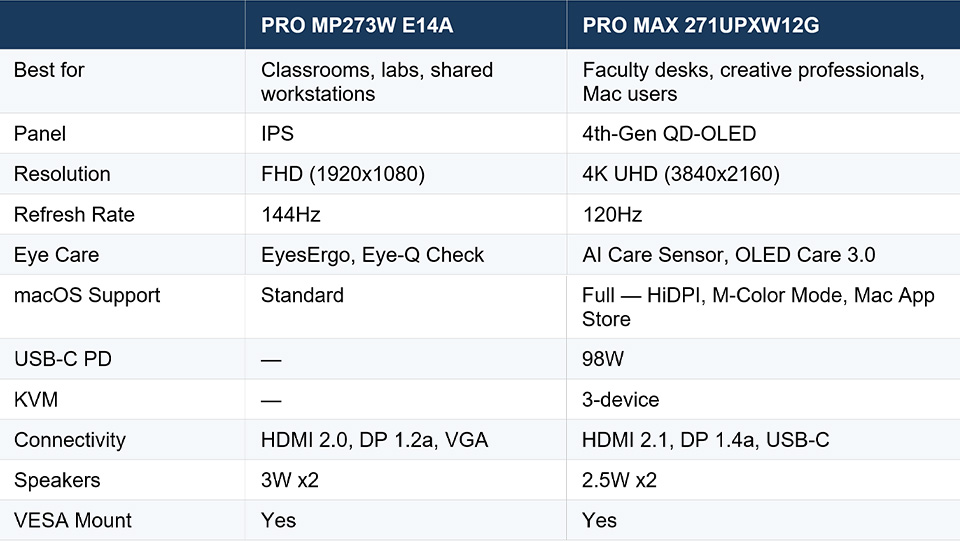
Side-by-Side: Choosing the Right PRO Monitor for Your Role
The Right Display for the Right Role
Display technology in education is no longer a peripheral decision. It shapes how students engage with content, how teachers present and create, and how institutions manage technology investment across their campuses.
MSI PRO monitors are built around a straightforward idea: match the display to the role. The PRO MP273W E14A delivers dependable, eye-friendly, plug-and-play performance at scale. The PRO MAX 271UPXW12G delivers professional-grade visual performance for educators who push their tools furthest. MSI will be showcasing both at ISTE 2026 in Orlando — stop by to see them in person.
Together, they cover the full education ecosystem — without compromise at either end.
MSI PRO monitors are built around a straightforward idea: match the display to the role. The PRO MP273W E14A delivers dependable, eye-friendly, plug-and-play performance at scale. The PRO MAX 271UPXW12G delivers professional-grade visual performance for educators who push their tools furthest. MSI will be showcasing both at ISTE 2026 in Orlando — stop by to see them in person.
Together, they cover the full education ecosystem — without compromise at either end.
Frequently Asked Questions
What is the best monitor for office work in an educational environment?
The MSI PRO MP273W E14A is designed for all-day office and classroom use — a 27-inch IPS panel with 144Hz, EyesErgo certification, built-in speakers, and broad connectivity including HDMI, DisplayPort, and VGA. Reliable, deployable, and suited to shared educational spaces at any scale.
What is the best monitor for eye strain for teachers and students?
Both MSI PRO monitors address eye strain — the PRO MP273W E14A with EyesErgo certification and Eye-Q Check break reminders, the PRO MAX 271UPXW12G with AI Care Sensor technology that automatically dims the panel when you step away from your desk.
Is the MSI PRO MAX 271UPXW12G compatible with MacBook?
Yes — it's the first MSI monitor purpose-built for macOS. It features 166 PPI HiDPI support, M-Color Mode color sync, native macOS keyboard integration, MSI Monitor Control Center on the Mac App Store, and 98W USB-C single-cable connectivity.
Can the MSI PRO MAX 271UPXW12G replace a docking station?
For most users, yes. With 4x USB 5Gbps Type-A, 2x HDMI 2.1, 1x DisplayPort 1.4a, 98W USB-C, 15W USB-C mobile charging, and 3-device KVM, the PRO MAX functions as a complete hub for multi-device workstations
Which MSI PRO monitor is right for a school district deployment?
The PRO MP273W E14A for large-scale classroom and lab rollouts — plug-and-play, legacy port support, built-in speakers, VESA mount, and MSI Power Link. The PRO MAX 271UPXW12G for faculty workstations, creative departments, and Mac-first staff who need professional display performance.
The MSI PRO MP273W E14A is designed for all-day office and classroom use — a 27-inch IPS panel with 144Hz, EyesErgo certification, built-in speakers, and broad connectivity including HDMI, DisplayPort, and VGA. Reliable, deployable, and suited to shared educational spaces at any scale.
What is the best monitor for eye strain for teachers and students?
Both MSI PRO monitors address eye strain — the PRO MP273W E14A with EyesErgo certification and Eye-Q Check break reminders, the PRO MAX 271UPXW12G with AI Care Sensor technology that automatically dims the panel when you step away from your desk.
Is the MSI PRO MAX 271UPXW12G compatible with MacBook?
Yes — it's the first MSI monitor purpose-built for macOS. It features 166 PPI HiDPI support, M-Color Mode color sync, native macOS keyboard integration, MSI Monitor Control Center on the Mac App Store, and 98W USB-C single-cable connectivity.
Can the MSI PRO MAX 271UPXW12G replace a docking station?
For most users, yes. With 4x USB 5Gbps Type-A, 2x HDMI 2.1, 1x DisplayPort 1.4a, 98W USB-C, 15W USB-C mobile charging, and 3-device KVM, the PRO MAX functions as a complete hub for multi-device workstations
Which MSI PRO monitor is right for a school district deployment?
The PRO MP273W E14A for large-scale classroom and lab rollouts — plug-and-play, legacy port support, built-in speakers, VESA mount, and MSI Power Link. The PRO MAX 271UPXW12G for faculty workstations, creative departments, and Mac-first staff who need professional display performance.
* Source: TechLila, Apple Mac Sales Statistics 2026.
Apple®, Mac®, and MacBook® are registered trademarks of Apple Inc. MSI and its products are not affiliated with Apple Inc. in any way.
Apple®, Mac®, and MacBook® are registered trademarks of Apple Inc. MSI and its products are not affiliated with Apple Inc. in any way.