Cyborg 15 vs Prestige 16 AI+: Which One Should You Buy?
Laptops

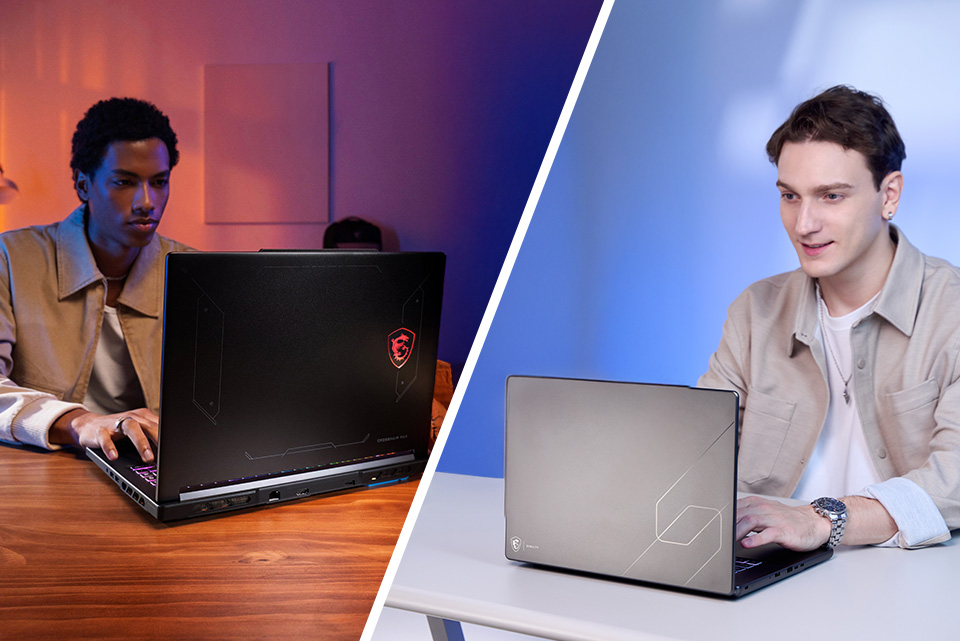
Picking between these two MSI laptops really comes down to one question: do you need a gaming machine that also handles school and work, or a work machine that can play a few games on the side? The Cyborg 15 and Prestige 16 AI+ are both great at what they do, but they're built for pretty different people. The Cyborg 15 (C13W) is our translucent, sci-fi styled gaming laptop that puts NVIDIA GeForce RTX 50 Series graphics within reach of a lot more budgets, while the Prestige 16 AI+ (C3M) packs Intel's newest Core Ultra Series 3 silicon, a 2.8K OLED touchscreen and an 81Whr battery into a 3.53 lb chassis.
Let's break down what each one actually offers, and more importantly, who should be buying which.
The Cyborg 15 (C13W): Real RTX Gaming, Priced to Fit
The Cyborg 15 is built around one goal: getting you genuine RTX 50 Series gaming performance at an entry-level price tag. The configuration we're looking at here, the C13WE-093US, pairs a 13th Gen Intel Core i5-13420H processor (8 cores, 4 Performance + 4 Efficiency, 12 threads, up to 4.6GHz) with an NVIDIA GeForce RTX 5050 Laptop GPU with 8GB of GDDR7, running at up to 70W with Dynamic Boost.
That RTX 5050 is the reason to buy this laptop. It's built on NVIDIA's Blackwell architecture and supports DLSS 4.5 with Multi Frame Generation, so supported games can render at a lower resolution and use AI to generate extra frames. Pair that with the 15.6-inch FHD 144Hz IPS-level display (100% sRGB) and you've got a setup tuned for esports titles like Valorant, Fortnite, Apex Legends and Counter-Strike 2, where frame rate matters more than anything.
It's also one of the more upgrade-friendly laptops in our lineup. This SKU ships with 16GB of DDR5 on a single stick, which leaves one of its two memory slots open, and it supports up to 96GB total. Storage is a 512GB NVMe PCIe Gen4 SSD. For connectivity you get a USB-C port with DisplayPort and Power Delivery, two USB-A ports, HDMI 2.1, Gigabit Ethernet for lag-free wired play, and Wi-Fi 6E.
The tradeoffs are what you'd expect from a gaming laptop at this price. At 4.37 pounds and 0.83-0.9 inches thick with a 150W power adapter, it's more of a desk-and-dorm machine than an all-day backpack laptop, and with a discrete GPU to feed, it's happiest plugged in when you're gaming.
The Prestige 16 AI+ (C3M): All-Day Power for Work and Creating
Now for the other side of this comparison. The Prestige 16 AI+ takes a completely different approach: instead of a dedicated graphics card, it's built around efficiency, portability and a display you'll actually want to look at all day.
It runs the Intel Core Ultra X7 processor 358H (16 cores, 16 threads, up to 4.8GHz), one of Intel's new Core Ultra Series 3 chips, with integrated Intel Arc B390 graphics (12 Xe-cores) and Intel AI Boost delivering up to 50 NPU TOPS. That makes it a Copilot+ PC, so it qualifies for Microsoft's on-device AI features like Recall, Windows Studio Effects and Live Captions with translation. The Prestige 16 AI+ C3MTG-227US SKU also comes loaded with 32GB of LPDDR5x-8533 memory and a 1TB NVMe SSD, double the Cyborg's RAM and storage.
The display is a 16-inch 2.8K OLED touchscreen (2880 x 1800) at 120Hz with 100% DCI-P3 color. You get OLED's deep blacks and wide color for photo and video editing, a 16:10 shape with extra vertical room for documents and spreadsheets, and touch for quick markups and scrolling.
Portability is where the Prestige really separates itself. It's just 0.55 inches thin and 3.53 pounds, charges over a compact 65W USB-C adapter, and packs an 81Whr battery. Add two Thunderbolt 4 ports, HDMI 2.1 (up to 8K at 60Hz), Wi-Fi 7, Bluetooth 6.0, a 1080p IR webcam with a privacy shutter and a fingerprint reader, and you've got a laptop that can go from an early flight to a full day of meetings without needing to live next to an outlet.
The tradeoff is gaming. Arc B390 graphics can handle lighter games well, but the discrete GPU in the Cyborg 15 delivers more performance for heavier titles. The memory is also soldered for efficiency, so the 32GB you buy is the 32GB you keep.
Cyborg 15 vs Prestige 16 AI+: Side-by-Side Specs
The Cyborg 15 wins on graphics and gaming speed. The Prestige 16 AI+ wins on display, memory, storage, battery and portability. Here's how they compare.
Best for
Gaming, streaming, 3D and GPU work
Business, travel, content creation, AI features
Processor
Intel Core i5-13420H (8 cores, 12 threads, up to 4.6GHz)
Intel Core Ultra X7 358H (16 cores, 16 threads, up to 4.8GHz)
Graphics
NVIDIA GeForce RTX 5050 Laptop GPU, 8GB GDDR7, up to 70W with Dynamic Boost
Intel Arc B390 integrated graphics (12 Xe-cores)
AI acceleration
NVIDIA Tensor cores, DLSS 4.5
Intel AI Boost NPU (50 TOPS), Copilot+ PC
Memory
16GB DDR5 (2 slots, up to 96GB)
32GB LPDDR5x-8533 (soldered)
Storage
512GB NVMe PCIe Gen4 SSD
1TB NVMe PCIe SSD
Display
15.6-inch FHD (1920 x 1080) IPS-level, 100% sRGB
16-inch 2.8K OLED (2880 x 1800), 100% DCI-P3
Refresh rate
144Hz
120Hz
Touchscreen
No
Yes
Ports
1x USB-C (DisplayPort, PD 3.0), 2x USB-A, HDMI 2.1, Gigabit Ethernet
2x Thunderbolt 4 (DisplayPort 2.1, PD 3.0), 2x USB-A, HDMI 2.1 (up to 8K 60Hz)
Wireless
Wi-Fi 6E
Wi-Fi 7, Bluetooth 6.0
Webcam
720p HD
1080p FHD IR with privacy shutter
Operating system
Windows 11 Home
Windows 11 Home
Battery
60Whr [verify: Walmart lists 53.5Wh]
81Whr
Charger
150W
65W USB-C
Weight
4.37 lb
3.53 lb
Thickness
0.83 to 0.9 in
0.55 in
▲ Configurations can vary by retailer, so check the listing for current pricing and exact specs before you buy. Specs come from the Walmart and Costco listings and MSI's official spec pages as of October 2026.
So, Which One Should You Actually Buy, the Cyborg or the Prestige?
The short answer is “it depends.” But let’s walk through the actual use cases for each.
Buy the Cyborg 15 (C13W) if:
- You play competitive shooters like Valorant, Fortnite or Apex Legends and want frame rates that actually use a 144Hz screen
- You're a student on a budget who needs one laptop for papers during the week and gaming on Friday night
- You want to stream or record gameplay in OBS using NVIDIA's NVENC encoder
- You're learning Blender, Unreal Engine or local AI tools that lean on NVIDIA CUDA and Tensor cores
- Your laptop mostly lives on a desk, plugged in at your dorm or gaming setup
- You want to upgrade RAM yourself later
Buy the Prestige 16 AI+ (C3M) if:
- You travel for work and want a light laptop, a big battery and a small USB-C charger
- You edit photos or video and want a 2.8K OLED with 100% DCI-P3 color
- You're a student who takes notes all day and wants a touchscreen plus a battery that doesn't send you hunting for outlets
- You're on video calls constantly and want a 1080p IR webcam
- You keep dozens of tabs, Teams, Excel and Lightroom open at once and want 32GB of RAM to handle it
- You want Copilot+ AI features that run on the laptop instead of in the cloud
- You game casually, sticking to indie, older or lighter titles
The Bottom Line
If you want to game, the Cyborg 15 gets you RTX 5050 performance, DLSS 4.5 and a 144Hz display at a price that's hard to beat, and you can pick one up at Walmart . If your laptop is really a work, school and travel tool first, the Prestige 16 AI+ gives you a 2.8K OLED touchscreen, 32GB of memory, an 81Whr battery and Copilot+ AI features in a 3.53 lb package, and it's available now at Costco.
Neither one is “better” across the board. The real question is which one fits the life you're actually going to use it in. You can find full specs on the Cyborg 15 and Prestige 16 AI+ product pages, and more comparisons like this one on the MSI blog.
FAQ
Is the MSI Cyborg 15 or Prestige 16 AI+ better for gaming?
The Cyborg 15 is better for gaming. Its NVIDIA GeForce RTX 5050 with DLSS 4.5 and 144Hz display are built for high frame rates, while the Prestige 16 AI+ relies on Intel Arc integrated graphics that suit lighter games.
Can the Prestige 16 AI+ play games at all?
Yes, with stronger Intel Arc graphics in the Core Ultra X7 358H, the Prestige 16 AI+ can run many popular titles despite not having discrete graphics.
Which laptop has better battery life?
The Prestige 16 AI+ has much better battery life. It has a larger 81Whr battery and no power-hungry discrete GPU, and the Core Ultra X7 358H is designed for efficiency. The Cyborg 15 is best used plugged in when gaming.
Is the Cyborg 15 good for school or office work?
Yes. The Core i5-13420H and 16GB of RAM handle Microsoft Office, Google Docs, browsing and video calls with no trouble.
Which is better for photo and video editing?
For most photo and video editing, the Prestige 16 AI+ is the better pick thanks to its 2.8K OLED touchscreen, 32GB of RAM and 1TB SSD. The Cyborg 15 is the better choice for GPU-heavy 3D rendering and CUDA-accelerated workflows.
What is a Copilot+ PC?
A Copilot+ PC is a Windows 11 laptop with a high-performance NPU that runs AI features locally. The Prestige 16 AI+ is a Copilot+ PC, which unlocks features like Windows Studio Effects and Live Captions with translation.
Is 16GB of RAM enough on the Cyborg 15?
For most games and everyday use, 16GB is enough. If you plan to stream while gaming or run heavy creative apps, you can add a second memory stick later.
Can I upgrade the RAM on the Prestige 16 AI+?
No, the Prestige 16 AI+ comes with 32GB of memory soldered to the motherboard.