DOOM: The Dark Ages RTX 50 vs. RX 9070 XT, 9070, 9060 XT Benchmarks
Graphics Cards
Doom: The Dark Ages is the latest iteration in the DOOM franchise, and its player count quickly climbed to an impressive 3 million, as gamers around the world jumped headfirst into the action!
This new chapter is a prequel in the series – taking you back in time to a grim, medieval world with a fresh, brutal spin to the Doom Slayer’s legendary war against Hell. With new weapons, epic battles, and some of the most intense action the series has ever seen, DOOM: The Dark Ages further builds on its signature fast-paced action that we all know and love.
The latest DOOM experience also comes with upgraded graphics and visuals, which means it demands modern hardware to get to those high, fluid framerates that make its fast-paced gameplay so addictive and immersive.
So, we set our in-house gamers to test it out using popular graphics cards on shelves today to find out what hardware will get you the performance you need.
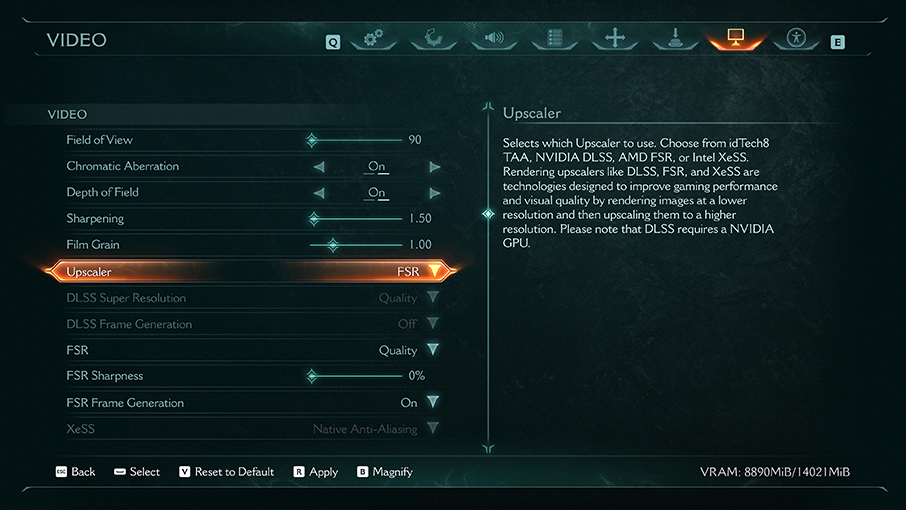
Benchmark Settings for DOOM: The Dark Ages: Ultra Nightmare Settings + DLSS/FSR Quality + Frame Generation ON (2x/4x)
For our GPU benchmarks, the first thing we did was turn up all graphics settings up to the coveted “Ultra Nightmare” levels.
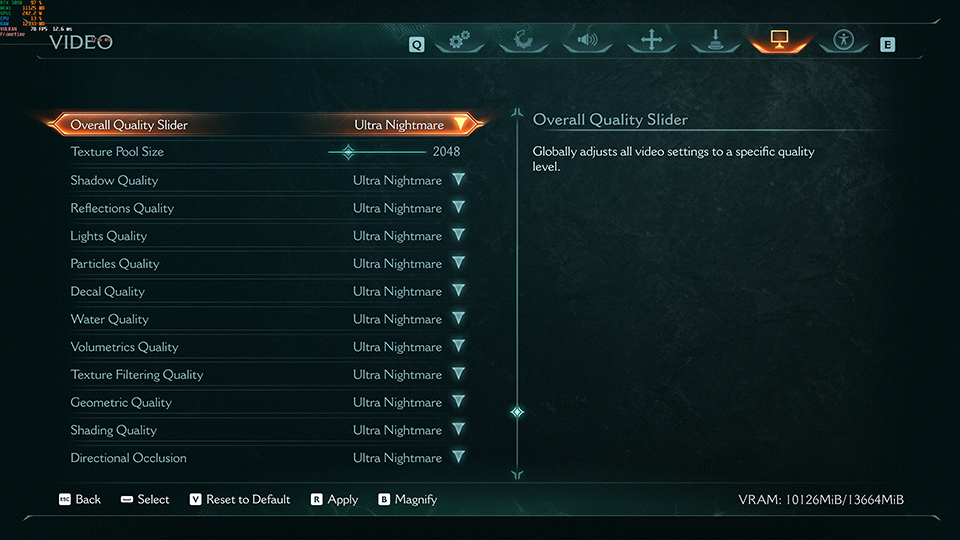
Next, of course, we set the resolution to the three most common gaming resolutions for each of our benchmark runs: 2160p (4K), 1440p, and 1080p (FHD).
DLSS was set to Quality to allow for a boost in performance without sacrificing visual fidelity for our GeForce lineup. We also left Frame Generation ON (4x) to boost frame rates for better fluidity and animation smoothing in this fast-paced title.
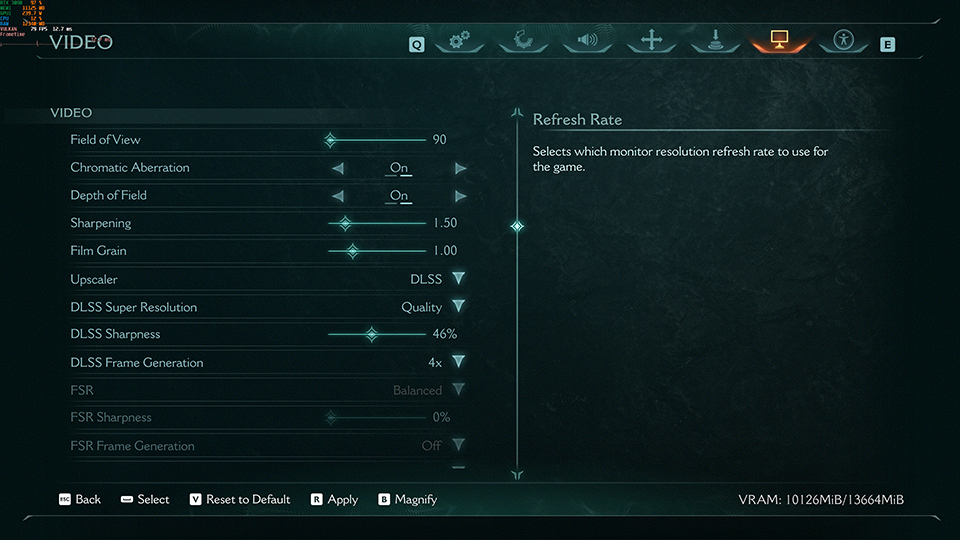
Similarly, for our Radeon graphics cards, we set FSR to Quality and Frame Generation to ON.
Since FSR doesn’t support 4x Frame Generation like DLSS Multi-Frame Generation, Radeon graphics cards will be limited to FSR’s 2x Frame Generation instead.
Note – Like many other modern AAA games, DOOM: The Dark Ages uses Ray Tracing by default and there is currently NO way to disable it. So, you need a graphics card that supports Ray Tracing to even launch the game.
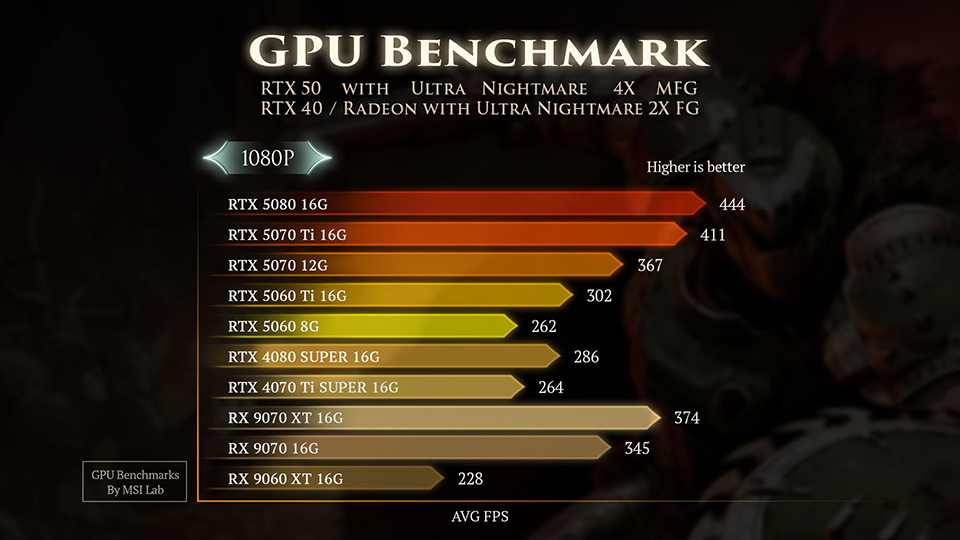
DOOM: The Dark Ages 1080p GPU Benchmarks (DLSS/FSR Quality; Frame Generation ON)
At 1080p, the entire RTX 50 series hits it out of the park – with the RTX 5060 Ti 16GB delivering a buttery-smooth average FPS of 302 even at these demanding settings. Of course, the RTX 5080 16GB outclasses its siblings with a blistering 444 FPS (average).
Radeon RX 9070 XT, 9070, 9060 XT Benchmarks for DOOM: The Dark Ages @ 1080p
So, what happens when we throw Team Red into the mix? With FSR Frame Generation ON, the Radeon RX 9060 XT 16GB manages a respectable 228 FPS. That said, the RTX 5060 Ti 16GB manages a much higher frame rate – delivering ~28% higher performance – while also leveraging the superior upscaling quality of DLSS.
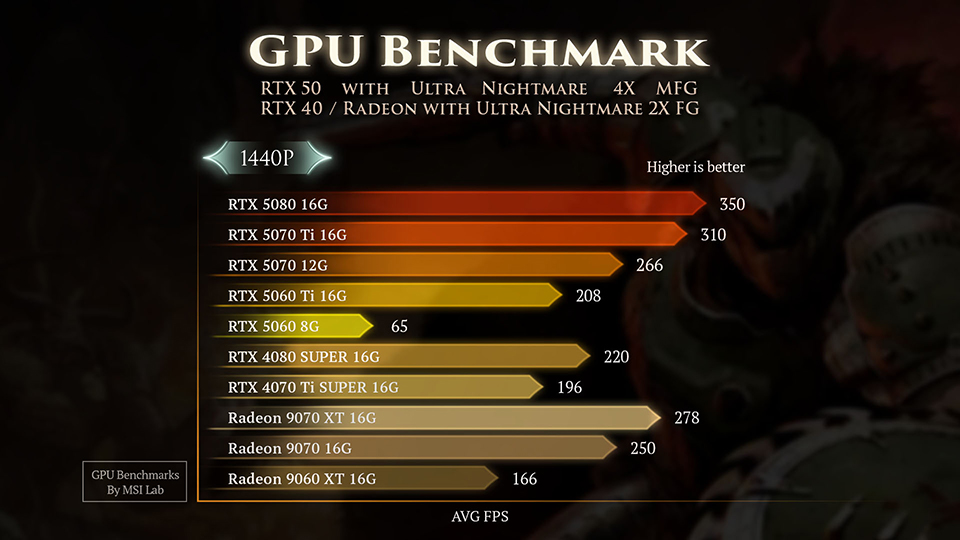
DOOM: The Dark Ages 1440p GPU Benchmarks (DLSS/FSR Quality; Frame Generation ON)
Upping the resolution to 1440p changes the performance landscape a bit. The RTX 5060 Ti 16GB sets the tone for the RTX 50 Series with an impressive average FPS of 208.
Radeon RX 9070 XT, 9070, 9060 XT Benchmarks for DOOM: The Dark Ages @ 1440p
When it comes to 1440p, the Radeon RX 9060 XT manages a decent average of 166 FPS, but still lags behind the RTX 5060 Ti 16GB by ~20%, while drawing ~16% more power.
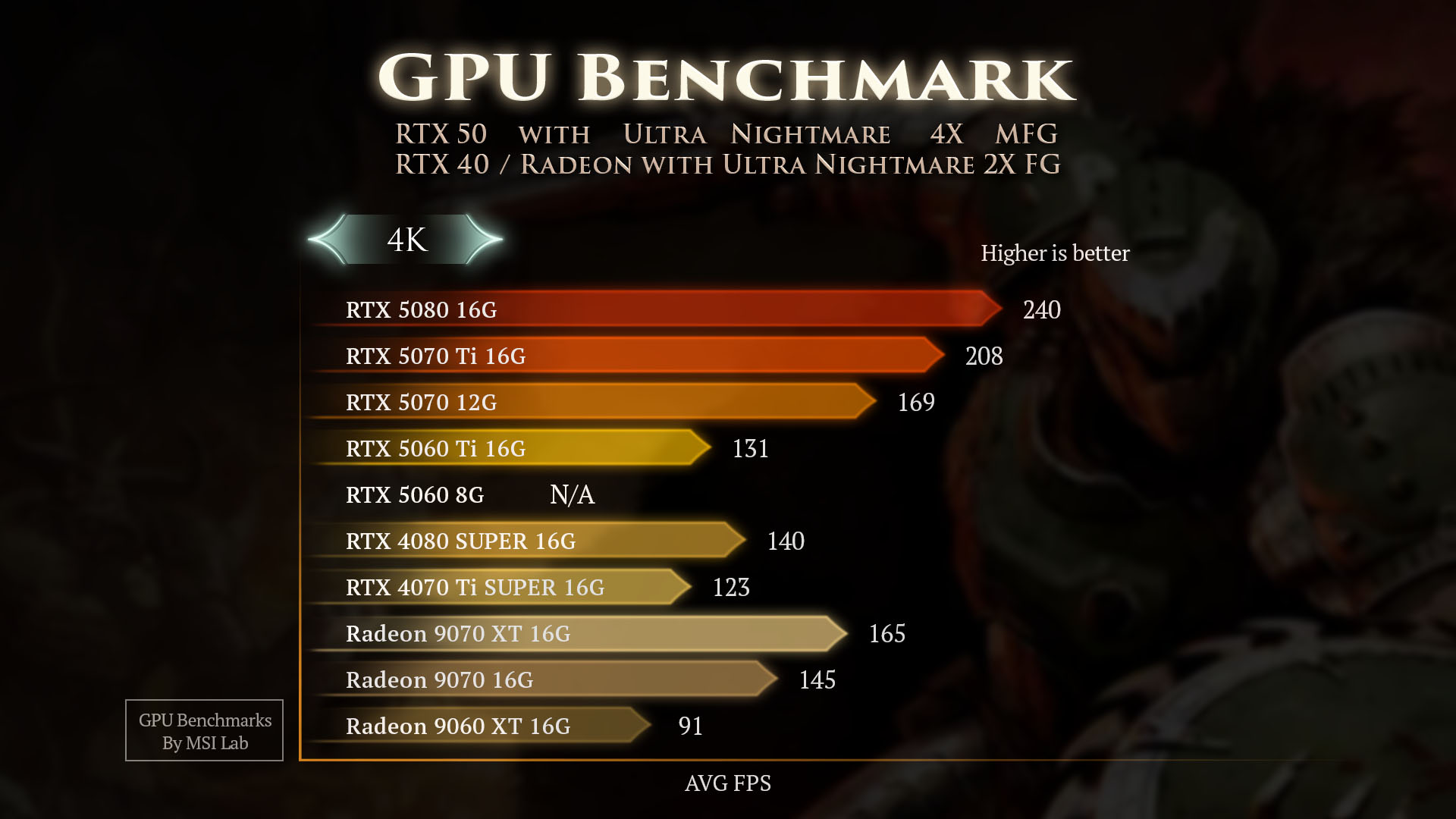
DOOM: The Dark Ages 4K GPU Benchmarks (DLSS/FSR Quality; Frame Generation ON)
At 4K, the performance delta between newer and last-gen GPU architectures becomes even more pronounced. The RTX 4070 Ti 16GB, with its last-gen Tensor cores, gets outclassed by the RTX 5070 Ti 16GB, which delivers an average FPS of 208.In fact,
even the RTX 5060 Ti 16GB easily handles the demands of 4K gaming – managing a solid 131 FPS (average) in DOOM: The Dark Ages.
In contrast, the RTX 5060 Ti 16GB delivers a strong average of 131 FPS thanks to its modern neural rendering capabilities.
Radeon RX 9070 XT, 9070, 9060 XT Benchmarks for DOOM: The Dark Ages @ 4K
For Radeon GPUs at 4K, the Radeon RX 9060 XT 16GB puts up a respectable average of 91 FPS with FSR Quality and Frame Generation enabled. However, this is around 30% lower than what the RTX 5060 Ti 16GB can do with DLSS Multi-Frame Generation enabled at the same resolution.
DOOM: The Dark Ages GPU Power Consumption: Let’s Talk Power
While both Radeon and GeForce graphics cards put up a good show, NVIDIA’s Blackwell architecture runs away with the prize when it comes to power efficiency.

Credit - Techspot RX 9070 XT Review
For example, the Techspot review of the Radeon RX 9070 XT shows that it uses 20% more power than an RTX 5070 Ti 16GB, while delivering slightly weaker performance in Warhammer 40,000: Space Marine 2. The same story repeats across both lineups, even when you look back at older GeForce offerings like the RTX 3080 10GB.
DOOM: The Dark Ages VRAM Requirements: Is 8GB VRAM Enough?
Games tend to need way more VRAM as you up the resolution, and DOOM: The Dark Ages is no exception. For example, at 4K and even 1440p, the 8GB and 10GB graphics cards clearly struggle compared to their 16GB counterparts.
-
-
RTX 5080 16G
RTX 5070 Ti 16G
RTX 5070 12G
RTX 5060 Ti 16G
RTX 5060 8G
RTX 4080 SUPER 16G
RTX 4070 Ti SUPER 16G
RX 9070 XT 16G
RX 9070 16G
RX 9060 XT 16G
1080p
AVG FPS
444
411
367
302
262
286
264
374
345
228
1080p
VRAM Usage, GB
8.1
7.9
7.5
7.4
7.7
7.5
7.5
7
7
6.9
1440p
AVG FPS
350
310
266
208
65
220
196
278
250
166
1440p
VRAM Usage, GB
9
8.9
8.3
8.3
7.4
8.4
8.3
7.6
7.6
7.4
4K
AVG FPS
240
208
169
131
15
140
123
165
145
91
4K
VRAM Usage, GB
11.3
11.4
10.3
10.6
7.7
10.4
10.5
9.1
9
9
In fact, even at 1080p, you’ll see that the game is reserving nearly 8GB of available VRAM, which doesn’t bode well for 8GB graphics cards in the near future (assuming you plan to play modern AAA games).
That said, graphics cards with 8GB VRAM are still completely fine for gamers on a limited budget who mostly play competitive games with settings dialed down. But for anything more demanding, the RTX 5060 Ti 16GB seems to hit that sweet spot of performance, cutting-edge technologies, and affordability.
The Best Graphics Cards for DOOM: The Dark Ages
Each AAA release further pushes the envelope in terms of graphics. Now that games have begun evolving to a point where Ray Tracing (RT) is no longer an optional toggle, graphics hardware needs some assistance from AI models and newer Neural rendering techniques to get to fluid, enjoyable frame rates.
MSI’s GeForce RTX 50 series lineup shines throughout our benchmark tests. They deliver superior visuals and 4x Multi-Frame Generation – offering significantly higher frame rates and smoother gameplay compared to both older GeForce offerings and current Radeon graphics cards limited to FSR with only 2x Frame Generation.
Although FSR 4 does come close to the quality of DLSS 4, game support for DLSS is far broader – making the GeForce offerings a much more compelling option for an upgrade.
If you’re looking to play at 4K, the RTX 5080 and the RTX 5070 Ti are incredible picks with immense raw horsepower. Dropping down to 1440p opens up the rest of the lineup – with the RTX 5060 Ti 16GB offering respectable performance and affordability. Opting for an RTX 5070 Ti, on the other hand, will enable much higher frame rates to leverage your high refresh rate monitors.
At 1080p, you can consider an RTX 5060 only if you’re on a very tight budget and you mostly play Esports titles. However, if you can stretch your budget a bit and do want to hop into games like DOOM: The Dark Ages, the RTX 5060 Ti 16GB is the best value option on shelves right now.
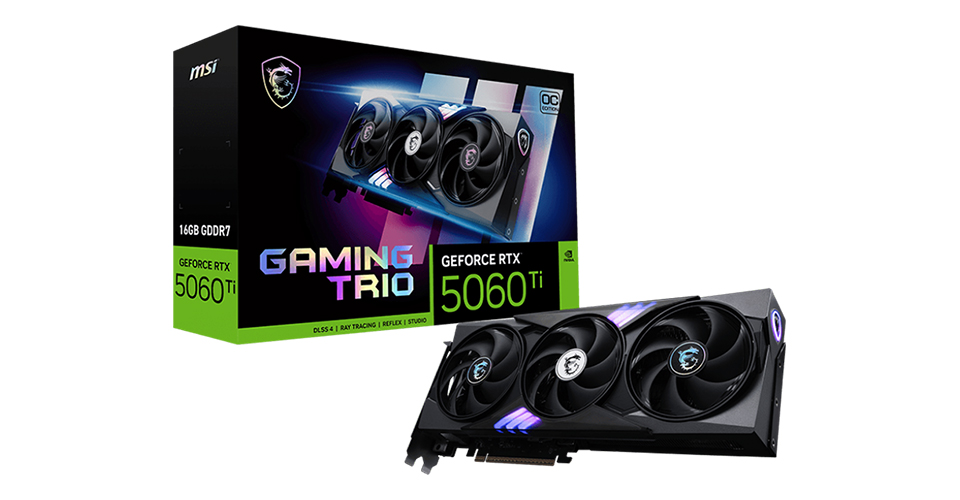
Learn More About GeForce RTX™ 5060 Ti 16G GAMING TRIO OC:
https://www.msi.com/Graphics-Card/GeForce-RTX-5060-Ti-16G-GAMING-TRIO-OC
Check Our Benchmark Video:
https://youtube.com/shorts/MxqoDoQ1Dyo?si=ihozBWvp9voL-fNl
https://www.msi.com/Graphics-Card/GeForce-RTX-5060-Ti-16G-GAMING-TRIO-OC
Check Our Benchmark Video:
https://youtube.com/shorts/MxqoDoQ1Dyo?si=ihozBWvp9voL-fNl