How Copilot+ PCs Are Transforming Classrooms with AI
Desktops
Classrooms are changing quickly these days. With technology becoming a key part of how we teach and learn, teachers are dealing with a lot of challenges, like not having enough time, meeting different student needs, and getting everyone ready for a future dominated by AI. Copilot+ PCs, equipped with advanced on-device AI, are shaking things up by giving both teachers and students some awesome tools to help them work smarter, not harder. This article dives into how Copilot+ PCs are changing the classroom game with AI technology. If you want to know more about what the MSI Copilot+ PCs can do, check out the link HERE.
Empowering Educators with AI Support
For teachers, time is super limited. Juggling lesson prep, adapting materials for different student levels, and grading assignments can pile up quickly, even for the most organized folks. That’s where Copilot+ PCs come in handy by taking care of the routine stuff and helping create adaptable materials on the fly.
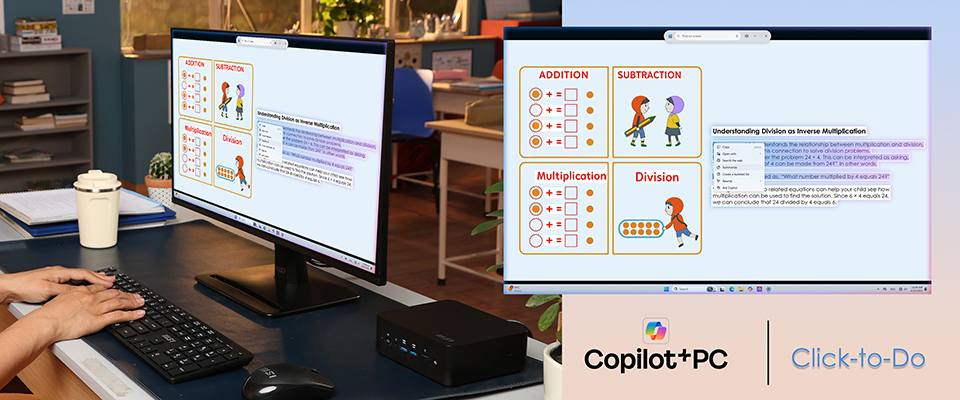
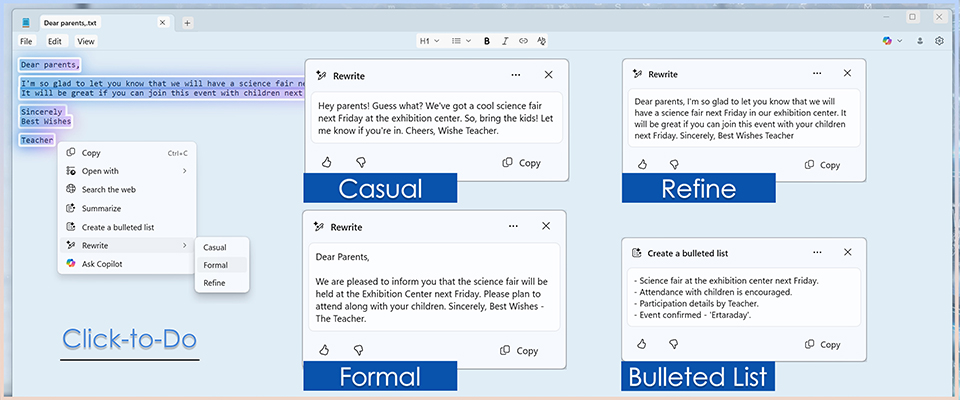
Let’s say a teacher assigns a reading from a history textbook. They can use the Click-to-Do feature on the Copilot+ PC to create a simplified summary of the text, making it easier for students who have trouble with tricky vocabulary. At the same time, they can ask Copilot+ PC to come up with critical thinking questions or debate topics based on the same passage, giving advanced learners a chance to delve deeper. All of this can be done in just minutes, letting the teacher meet different learning needs without fussing over separate resources.
Here’s how it works:
1. The teacher opens the passage on the Copilot+ PC.
2. Highlights the text and picks options like “Summarize,” “Create a bulleted list,” or “Rewrite with casual, formal, or refined tone” using Click-to-Do.
3. If they need more topics, they just hit the Ask Copilot button and type prompts like “Create three advanced discussion questions.”
Just like that, differentiated materials are ready to go for class. This ability to customize content on the spot lets teachers connect with students at their level, cutting down on prep time and making sure no one gets left behind.
Enhanced Security & Easier Organization with Local AI
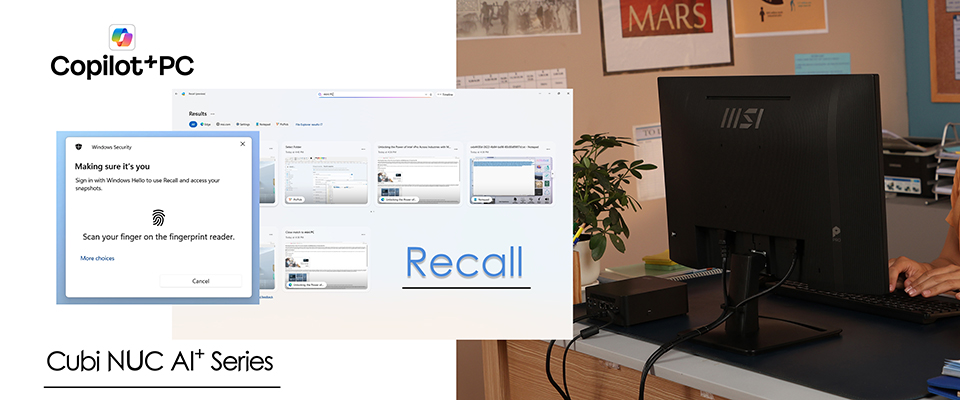
One of the major concerns about AI in schools is data privacy. However, Copilot+ PCs perform many AI tasks directly on the device, such as Recall, which uses a Neural Processing Unit (NPU) to keep sensitive information local. This reduces dependency on cloud services, aligning with schools' priorities regarding student data protection and regulatory compliance. With numerous classes, assignments, and projects, it’s easy to feel swamped. Copilot+ PCs offer useful tools like Recall, enabling students to quickly find old notes, documents, or websites simply by describing what they need. Teachers also manage a plethora of documents, lesson slides, and online resources. Thanks to Recall, they can instantly retrieve anything from their digital history by just stating what they're looking for—such as “the slide with the biology diagram from last Friday.” This feature minimizes the hassle of sorting through files and folders, saving valuable time.
Making Admin Work Easier for Educators
Aside from lesson planning, teachers often find themselves buried in admin tasks like writing emails, creating progress reports, and putting together grading rubrics. With Copilot+ PCs, these repetitive chores become a breeze thanks to natural language prompts. Teachers can just type in requests like “Draft a professional email to parents about the upcoming science fair” or “Create a grading rubric for a group presentation,” and the AI generatess quick drafts that can be easily tweaked.
This boost in productivity means teachers can spend more time connecting with their students instead of getting bogged down by paperwork. By cutting down on the routine stuff, they can focus on what really counts—helping their students thrive.
Personalizing Learning for Every Student
One of the biggest challenges in education is figuring out how to meet the different learning needs of students. Some kids do great with lots of text, while others learn better with visuals or hands-on activities. Copilot+ PCs make it easier to personalize lessons by changing up the format to fit everyone’s style.
For instance, math teachers can provide step-by-step solutions for those who might be struggling while also creating tougher practice problems for the advanced students. Language teachers can use AI to translate materials or put together vocabulary exercises that match different skill levels. This flexibility makes sure that no student gets left behind, while the high achievers stay interested. Plus, a student who has a hard time taking notes can use Copilot+ to summarize important points from a lecture, while advanced learners can take advantage of the same tech to come up with extra research ideas, which helps them dive deeper into topics. By adjusting to each student’s pace and learning style, Copilot+ PCs help make classrooms more inclusive and fun.
With all these AI features, lessons can also become more interactive and engaging. Teachers can use AI tools to create presentations together, whip up quiz questions on the spot, or brainstorm group project ideas with students as they go. Instead of getting stuck in preparation mode, educators can focus on being creative and innovative in the classroom, with AI as a helpful teaching buddy.
Breaking Down Language Barriers & Unlimited Creativity for Students
In multilingual classrooms, teachers often struggle to ensure all their students can keep up. Copilot+ PCs with Live Captions and Translation offer real-time subtitles and translations for lectures, videos, and class discussions. This is super helpful for students who are deaf or hard of hearing. Since the tech automatically takes care of this, teachers don’t have to worry about creating separate materials for different students. It levels the playing field and saves teachers a lot of time. Overall, it helps create a more inclusive environment where every student can join in and participate actively.
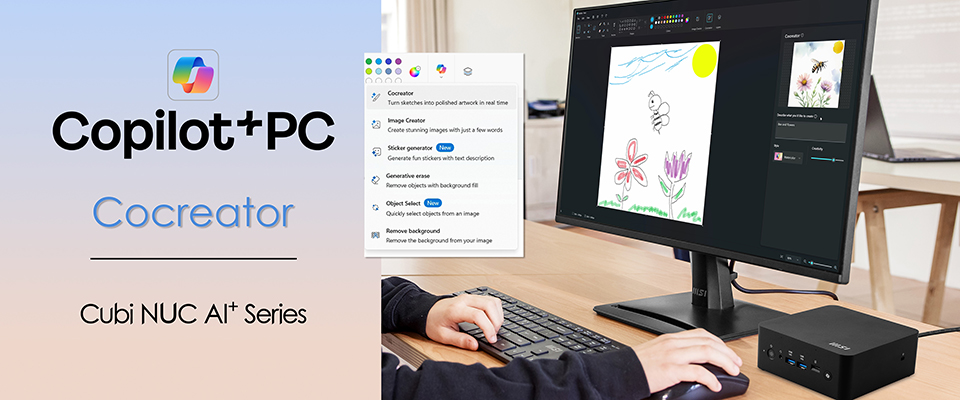
With tools like Cocreator, students can easily turn their ideas into visuals or designs. Imagine a history project featuring AI-generated images of ancient civilizations or a science report with diagrams made in a flash. No more spending forever searching for the right pictures online—students can whip up unique visuals in no time, boosting their creativity and saving hours.
MSI Copilot+ PCs for Education - Cubi NUC AI+ 2MG
Copilot+ PCs come in various forms, but compact desktops like the MSI Cubi NUC AI+ 2MG series offer distinct advantages in classrooms. Its small size allows it to fit easily into crowded computer labs or shared learning spaces while delivering powerful AI-driven performance. The device features secure login via a fingerprint power button, Thunderbolt connectivity for fast data transfer, and MSI Power Link for simplified device management, making it both practical and future-proof.
Additionally, the Cubi NUC AI+ 2M is made from post-consumer recycled (PCR) plastics, supporting schools in their efforts toward sustainability and environmental responsibility. By choosing devices like this, educators can enhance their teaching with AI and promote greener learning environments.
The classroom of the future is already here, powered by AI. With the MSI Copilot+ PCs, teachers can personalize learning for every student, break down language barriers, and alleviate administrative burdens. Most importantly, these devices help educators reclaim their time, allowing them to focus on inspiring and guiding the next generation. In summary, Copilot+ PCs do not replace teachers; they empower them to teach easier, reach more students, and create classrooms where every learner can thrive.
For more information about the MSI Copilot+ PC, please visit: https://www.msi.com/Landing/Copilot-plus-PC-desktops