How to Lower CPU Temperature and Improve Performance for AMD Ryzen 7 9850X3D
Motherboards
AMD recently introduced the new Ryzen 7 9850X3D processor. Besides performance, one of the main concerns for users is managing CPU voltage and temperature. This guide explains how to reduce CPU voltage and temperature without sacrificing performance, and potentially even achieving a small performance improvement.
We previously demonstrated how to use AMD Curve Optimizer to reduce core temperatures on the Ryzen 9 9950X3D. The same method also applies to the Ryzen 7 9850X3D. Users can find the optimal settings to lower temperatures while improving performance. For more details, please refer to this article.
Lowering Voltage and Temperature with Curve Optimizer
Test results show that setting Curve Optimizer to -20 and -30 reduces Ryzen 7 9850X3D CPU temperature by approximately 2.6°C and 5.3°C. At the same time, Cinebench R23 performance improves by about 2.5-3%.
Note: Setting the voltage too low may cause system instability. It is recommended to adjust settings gradually and test stability step by step.
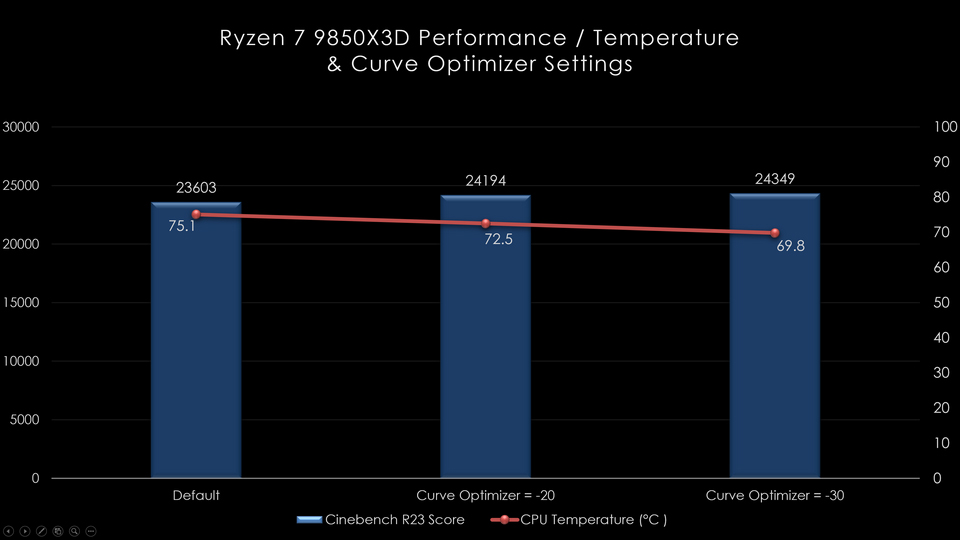
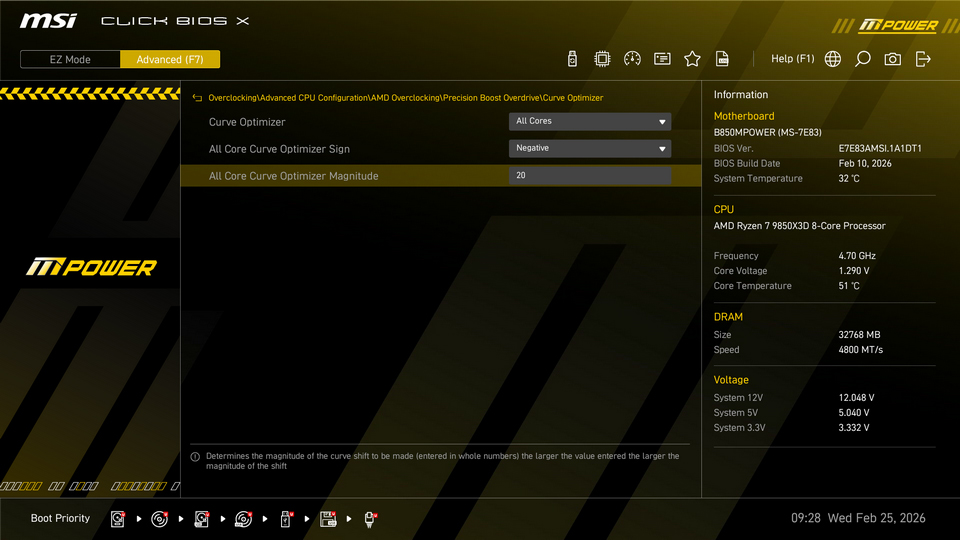
▲ Curve Optimizer helps reduce CPU core voltage and temperature.
MSI PBO Enhanced Mode Boost — Further Improving Ryzen 7 9850X3D Performance
In addition to reducing voltage and temperature with Curve Optimizer, users who want higher performance can adjust settings such as PBO (Precision Boost Overdrive), CPU Boost Clock Override, and PBO Scalar to unleash power limits and increase boost frequency.
Adjusting PBO Limits
You can modify PBO settings to increase CPU power and current limits, such as PPT (Package Power Tracking), TDC (Thermal Design Current), and EDC (Electrical Design Current), to maximize performance potential
CPU Boost Clock Override
CPU Boost Clock Override increases the maximum CPU frequency limit. The adjustment is made in 25 MHz increments and supports up to +200 MHz. However, the CPU may not always run at the maximum frequency. AMD Precision Boost algorithm monitors CPU temperature, power, current, and workload in real time, and dynamically adjusts frequency to reach the highest possible speed when conditions allow.
PBO Scalar
PBO Scalar overrides the AMD default silicon health management to potentially achieve higher sustained frequencies under CPU load. It provides settings from 1X to 10X, with 1X as the default.
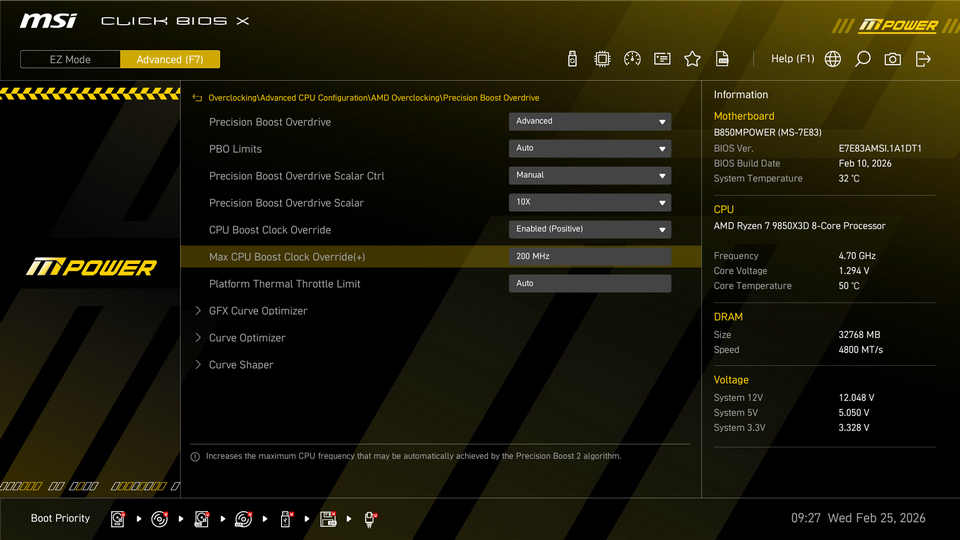
▲ PBO Scalar and CPU Boost Clock Override can also help improve performance.
One-Click Optimization with MSI Click BIOS X
For users who are not familiar with manual tuning, MSI Click BIOS X provides the PBO Enhanced Mode Boost feature. This function includes two preset profiles, allowing users to improve performance with a single click.
According to test results, enabling PBO Enhanced Mode Boost not only helps manage CPU temperature effectively but also delivers a performance increase of approximately 2% to 3%.
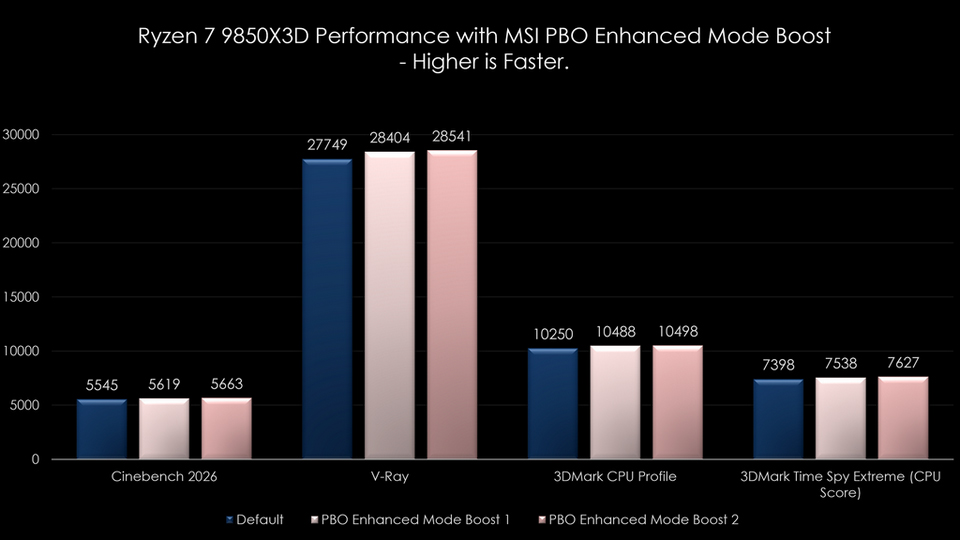
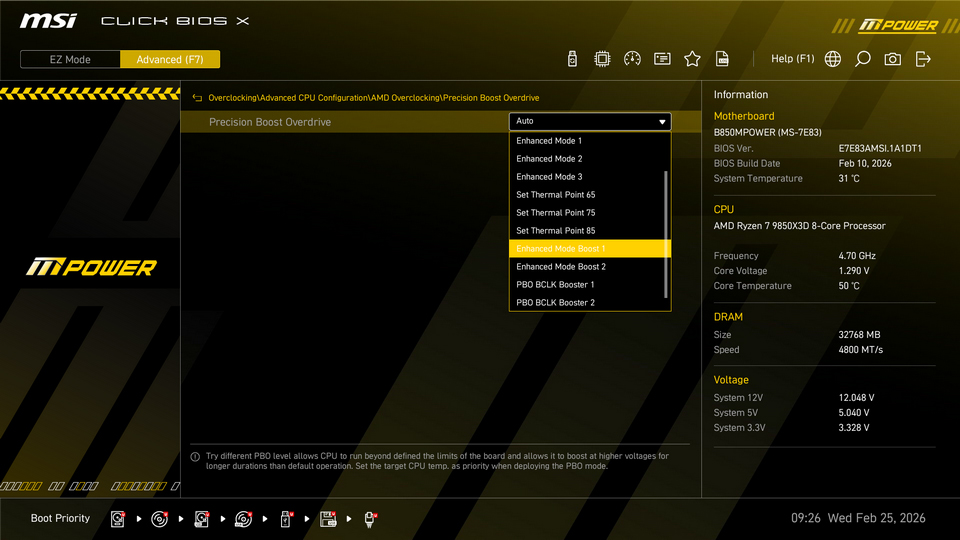
▲ PBO Enhanced Mode Boost provides two profiles, allowing users to select a stable setting based on their CPU quality.
Notes:
- CPU performance and temperature may vary depending on system and hardware configurations.
- Performance improvements may vary depending on system and hardware configurations.
Test Platform:
- CPU: AMD Ryzen 7 9850X3D
- Motherboard: MSI B850MPOWER
- Memory: Kingston FURY Beast DDR5 16GB ×2
- Graphics Card: MSI GeForce RTX 5090 32G VANGUARD SOC
- CPU Cooler: MSI MPG CORELIQUID P13 360
- Power Supply: MSI MEG Ai1300P PCIE5
- Operating System: Microsoft Windows 11 25H2
MSI X870E / X870 / B850 / B840 Series Motherboards:
https://www.msi.com/Landing/amd-am5-x870e-x870-b850-b840-ryzen-9000-x3d-best-ai-gaming-motherboard
https://www.msi.com/Landing/amd-am5-x870e-x870-b850-b840-ryzen-9000-x3d-best-ai-gaming-motherboard