Onimusha Way of the Sword: Best Settings and GPU Benchmarks for RTX 5080, 5070 and More
Graphics Cards
Key takeaways
- Best card overall: RTX 5070 12G — 88.6 FPS natively at 1440p on the Ultra preset, 234.3 FPS with DLSS.
- Best card for 4K: RTX 5080 16G — 74.2 FPS native on Ultra and 242.2 FPS with DLSS. The real entry point for native 4K is the RTX 5070 Ti 16G at 64.6 FPS.
- 1440p is the sweet spot. All five cards reach at least 58.9 FPS natively on Ultra with ray tracing High, up to 123.6 FPS on the RTX 5080.
- VRAM: 8GB is enough at 1080p and 1440p. At 4K on Ultra the game allocates 9.9–10.1 GB, while the 8GB card tops out at 7.8 GB — so 16GB is the safer buy.
- The DLSS On figures include 4x frame interpolation. Gains run from +93% to +232%, but three of every four frames on screen are generated — this is smoothness, not rendering performance. The in-game benchmark's own Score actually falls when you enable it.
- DLSS does not save power here. Power draw goes up slightly in almost every pair; the RTX 5080 pulls an extra 36.4 W at 1080p Medium.
Capcom's Onimusha: Way of the Sword launched on September 4, the first mainline entry in the series after a long silence, and it reached Steam's top new releases chart in its launch week. It also sets a hard floor on the PC side: Windows 11 as the minimum OS, an SSD install, and a 16GB memory baseline — machines still on Windows 10 will not run it at all.
So we benchmarked five GeForce RTX 50 graphics cards in-house — the RTX 5080, RTX 5070 Ti, RTX 5070, RTX 5060 Ti and RTX 5060 — at 1080p, 1440p and 4K, with DLSS 4.5 off and on, on two settings profiles, across 60 logged configurations.
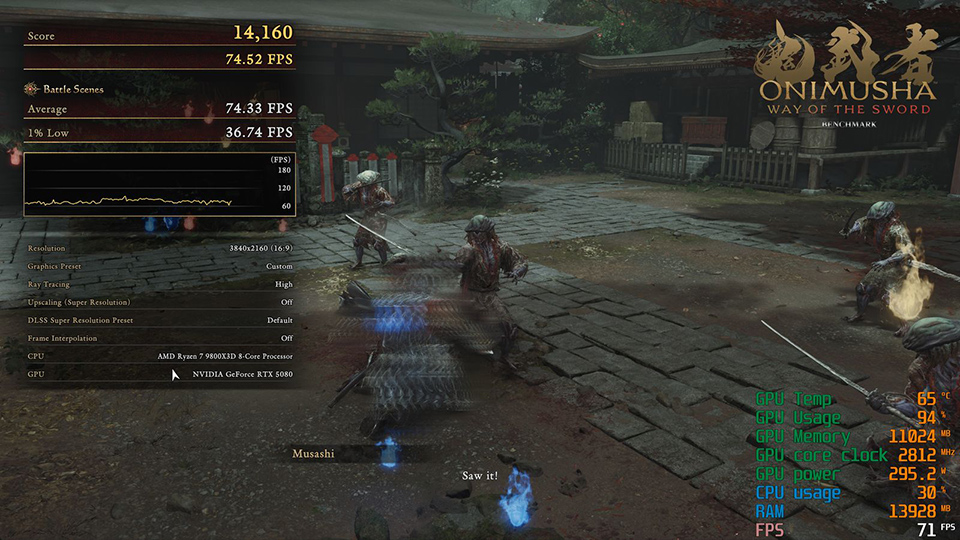
Onimusha: Way of the Sword at 4K, Ultra preset, ray tracing High, native rendering — MSI GeForce RTX 5080 16G. The overlay reads 71 FPS, 295.2 W and 65°C at this moment, against a 74.2 FPS run average.
Onimusha: Way of the Sword Test Setup: Ultra and Medium Presets, DLSS Quality Mode, 4x Frame Interpolation
Hardware Setup
All five graphics cards ran on the same MSI platform, so the only thing that changes from result to result is the GPU itself.
- Motherboard: MSI MPG X870E CARBON WIFI
- CPU: AMD Ryzen 7 9800X3D
- CPU Cooler: MSI MEG CORELIQUID S360
- Memory: TOUGHRAM XG RGB D5 DDR5 6600MT/s 32GB (16GB × 2)
- Storage: MSI SPATIUM M570 PRO PCIe 5.0 NVMe M.2 FROZR
- Power Supply: MSI MEG Ai1300P PCIE5
- Graphics cards: MSI GeForce RTX 5080 16G, RTX 5070 Ti 16G, RTX 5070 12G, RTX 5060 Ti 16G, RTX 5060 8G
- GPU driver: NVIDIA 610.88
In-Game Settings
We ran two settings profiles — one for image quality, one for frame rate — and measured each of them twice at every resolution: once with upscaling off, once with DLSS 4.5 on. The game ships four graphics presets (Ultra, High, Medium and Low); we took the top one and the middle one. DLSS was set to Quality mode, which lifts performance without giving up much detail, with 4x frame interpolation enabled to smooth the action out further.
The two settings profiles used throughout this article
Profile
Graphical Fidelity
Upscaling Mode
DLSS SR Preset
Frame Interpolation
Ray Tracing
Quality profile
Ultra
NVIDIA DLSS 310.5.2 — Qualit
DLSS 4.5 Preset M
4x
High
Performance profile
Medium
NVIDIA DLSS 310.5.2 — Quality
DLSS 4.5 Preset M
4x
High
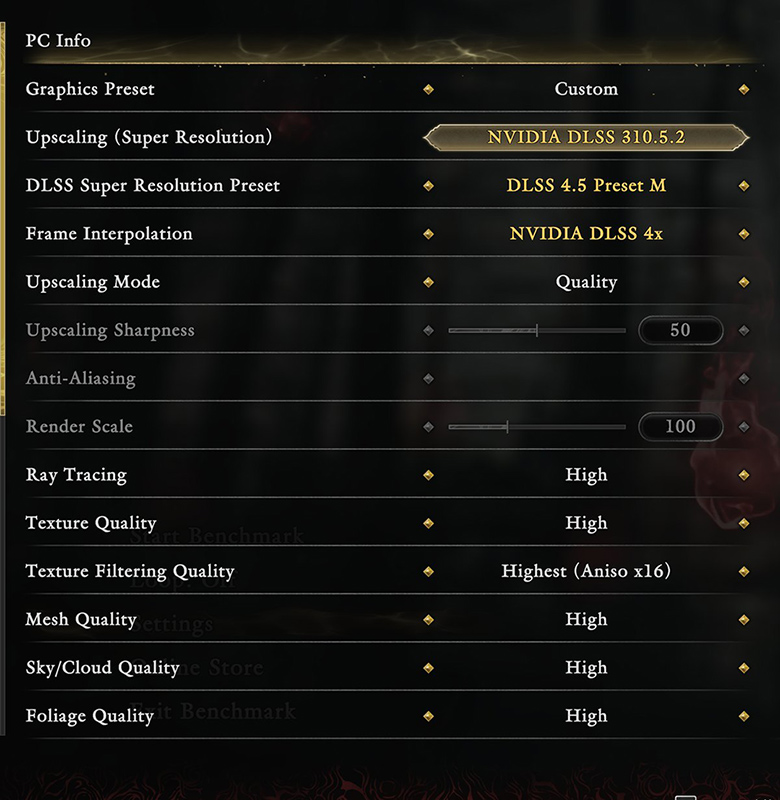
The in-game settings for this article's Quality profile, exactly as configured. Changing an upscaling option makes Graphics Preset display as Custom; the fidelity settings below it are still the Ultra preset's values.
Enabling DLSS here does two separate things. Super Resolution renders the game at a lower internal resolution and upscales the result to your monitor's resolution — that part is a genuine rendering gain. Frame interpolation — the name the game's own menu uses — then creates three additional frames at 4x for every rendered one, and those never pass through the rendering pipeline at all. NVIDIA describes DLSS 4.5 Multi Frame Generation this way: "DLSS 4.5 can generate five additional frames for every single natively rendered one, for a maximum 6X multiplier" (NVIDIA DLSS 4.5 technical brief, 2026). We used the 4x mode.
So the DLSS Off and DLSS On numbers are not measuring the same thing. With it off, you are reading the card's raw rendering ability. With it on, you are reading the refresh rate your eyes receive, three quarters of which is generated. Both are useful, but averaging them together gets you the wrong answer: one column is rendering throughput, the other is display refresh rate.
Ray tracing was fixed at High for every single run. We held it there across all five cards so one consistent baseline applies to every number in this article. Unlike games that force it on, ray tracing in Onimusha: Way of the Sword is adjustable — Off, Low, Medium and High — and turning it down does recover performance. We did not measure that, so you will not find any estimates for it here.
The game also supports AMD FSR 3.1; we only tested DLSS. 1% lows were logged, read off the in-game benchmark result screens. Input latency was not measured, so this article draws no conclusions about how frame interpolation feels to play.
Onimusha: Way of the Sword GPU Benchmarks for 1080p: High Refresh on Any RTX 50 Card
1080p on the Ultra Preset
Average FPS and VRAM allocation at 1920×1080 on the Ultra preset, ray tracing High
Graphics card
DLSS Off
(Avg. FPS)
(Avg. FPS)
DLSS On
(Avg. FPS)
(Avg. FPS)
DLSS Off
VRAM (GB)
VRAM (GB)
DLSS On
VRAM (GB)
VRAM (GB)
RTX 5080 16G
158.7
373.0
8.4
9.1
RTX 5070 Ti 16G
143.9
331.2
8.5
9.1
RTX 5070 12G
120.8
274.2
8.4
9.0
RTX 5060 Ti 16G
92.5
205.4
8.3
9.0
RTX 5060 8G
83.6
179.4
7.7
7.8
At 1080p every RTX 50 card already runs fast before you touch a single upscaling option — 83.6 FPS on the RTX 5060, 158.7 FPS on the RTX 5080, and that is with ray tracing at High. Switch on DLSS Quality mode with 4x frame interpolation and all five land between 179.4 and 373.0 FPS, enough to fill a 144 Hz or 165 Hz panel from any card in the lineup. VRAM is a non-issue at this resolution: the Ultra preset peaks at 9.1 GB.
1080p on the Medium Preset
Average FPS and VRAM allocation at 1920×1080 on the Medium preset, ray tracing High
Graphics card
DLSS Off
(Avg. FPS)
(Avg. FPS)
DLSS On
(Avg. FPS)
(Avg. FPS)
DLSS Off
VRAM (GB)
VRAM (GB)
DLSS On
VRAM (GB)
VRAM (GB)
RTX 5080 16G
189.7
408.4
7.5
8.2
RTX 5070 Ti 16G
174.2
365.3
7.5
8.2
RTX 5070 12G
149.5
303.4
7.4
8.1
RTX 5060 Ti 16G
116.6
227.7
7.4
8.1
RTX 5060 8G
106.0
204.5
7.1
7.5
Dropping to Medium buys another 19.5% to 26.9% — the RTX 5080 reaches 189.7 FPS and even the entry-level RTX 5060 manages 106.0 FPS. With DLSS on, the range is 204.5 to 408.4 FPS. VRAM allocation falls further to 7.1–8.2 GB, leaving 8GB cards with room to spare.
Once resolution stops being the limit, this game compresses the distance between the entry-level RTX 5060 and the flagship RTX 5080: 1.9× natively at 1080p Ultra, and 1.8× on Medium. You do not need to spend flagship money to run this game smoothly at 1080p.
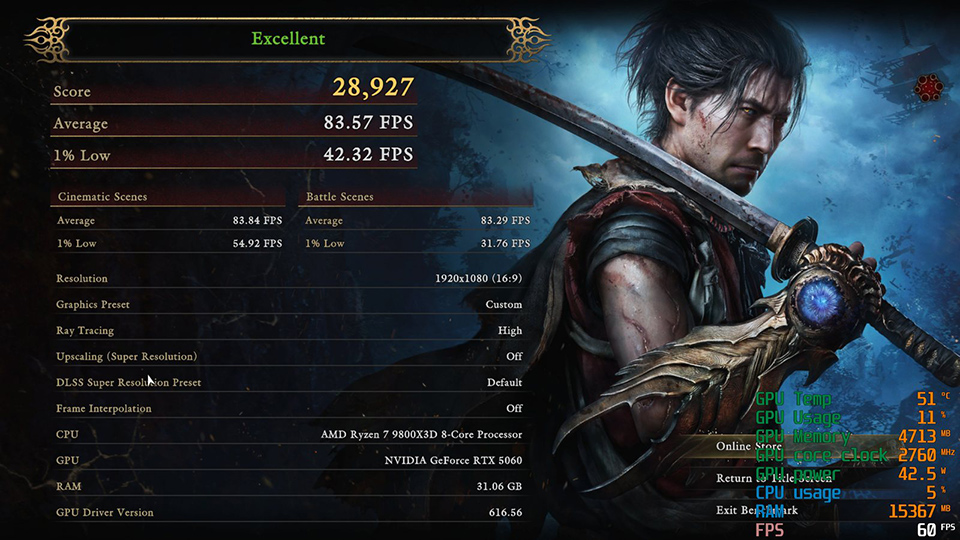
1080p, Ultra preset, ray tracing High, upscaling off — the entry-level MSI GeForce RTX 5060 8G averages 83.57 FPS, and the in-game benchmark rates the run Excellent.
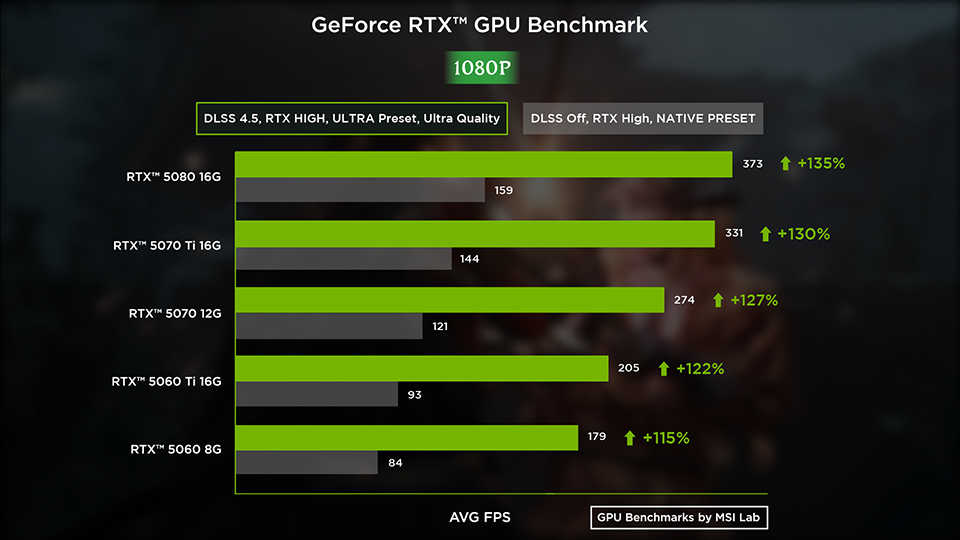
Average FPS at 1920×1080 on the Ultra preset with ray tracing High. Grey bars are native rendering, green bars add DLSS Quality mode with 4x frame interpolation. Every card clears 83.6 FPS before any upscaling, and DLSS puts all five between 179.4 and 373.0 FPS. The +115% to +135% gains are the smallest of the three resolutions — DLSS returns the most where the native load is heaviest.
Onimusha: Way of the Sword GPU Benchmarks for 1440p: The Sweet Spot
1440p on the Ultra Preset
Average FPS and VRAM allocation at 2560×1440 on the Ultra preset, ray tracing High
Graphics card
DLSS Off
(Avg. FPS)
(Avg. FPS)
DLSS On
(Avg. FPS)
(Avg. FPS)
DLSS Off
VRAM (GB)
VRAM (GB)
DLSS On
VRAM (GB)
VRAM (GB)
RTX 5080 16G
123.6
325.8
8.7
9.1
RTX 5070 Ti 16G
109.4
286.7
8.8
9.1
RTX 5070 12G
88.6
234.3
8.2
8.9
RTX 5060 Ti 16G
66.1
173.7
8.8
9.1
RTX 5060 8G
58.9
151.4
7.7
7.8
On RTX 50 hardware, 1440p is the sweet spot for Onimusha: Way of the Sword. Natively on the Ultra preset with ray tracing High, the RTX 5080 averages 123.6 FPS, the RTX 5070 Ti 109.4 FPS, the RTX 5070 88.6 FPS and the RTX 5060 Ti 66.1 FPS, with even the RTX 5060 at 58.9 FPS — 1.1 FPS short of 60, which in practice still plays fine. Add DLSS Quality mode and 4x frame interpolation and all five clear 150 FPS, the RTX 5060 included at 151.4 FPS.
1440p on the Medium Preset
Average FPS and VRAM allocation at 2560×1440 on the Medium preset, ray tracing High
Graphics card
DLSS Off
(Avg. FPS)
(Avg. FPS)
DLSS On
(Avg. FPS)
(Avg. FPS)
DLSS Off
VRAM (GB)
VRAM (GB)
DLSS On
VRAM (GB)
VRAM (GB)
RTX 5080 16G
148.8
357.0
7.8
8.2
RTX 5070 Ti 16G
132.7
315.2
7.8
8.2
RTX 5070 12G
108.9
258.4
7.6
8.0
RTX 5060 Ti 16G
82.5
192.1
7.7
8.0
RTX 5060 8G
73.6
171.5
7.0
7.5
Medium adds another 20.3% to 24.9%, which pulls both of the borderline cards clear: the RTX 5060 Ti to 82.5 FPS and the RTX 5060 to 73.6 FPS, so all five cards sit comfortably above 60 FPS natively. With DLSS on, the range is 171.5 to 357.0 FPS.
VRAM stays relaxed on both profiles at 1440p — 9.1 GB at most on Ultra, 8.2 GB on Medium, with the 8GB RTX 5060 allocating only 7.0–7.8 GB. If you are running a 1440p 144 Hz or 165 Hz monitor, any RTX 50 card will fill it.
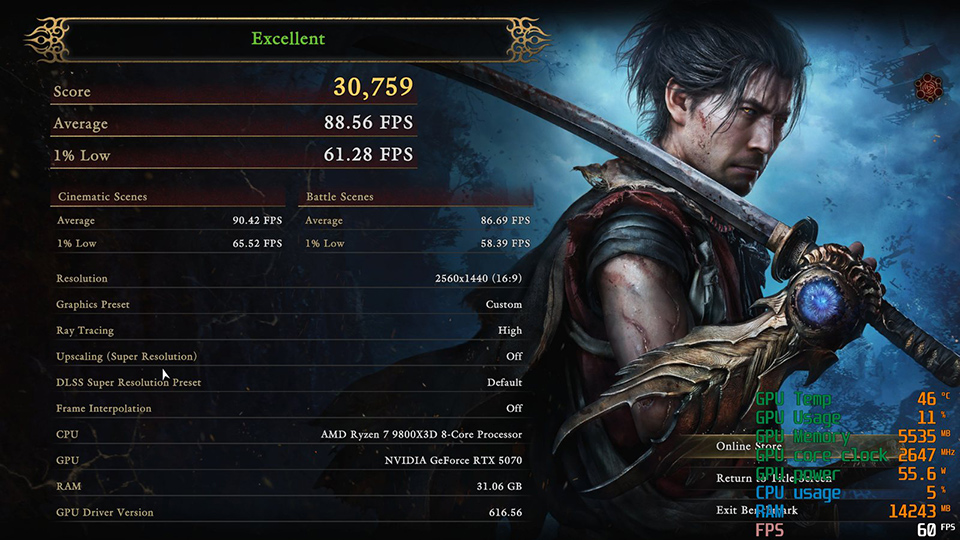
1440p, Ultra preset, ray tracing High, upscaling off — MSI GeForce RTX 5070 12G averages 88.56 FPS with a 61.28 FPS 1% low. This is why we pick it as the 1440p card.
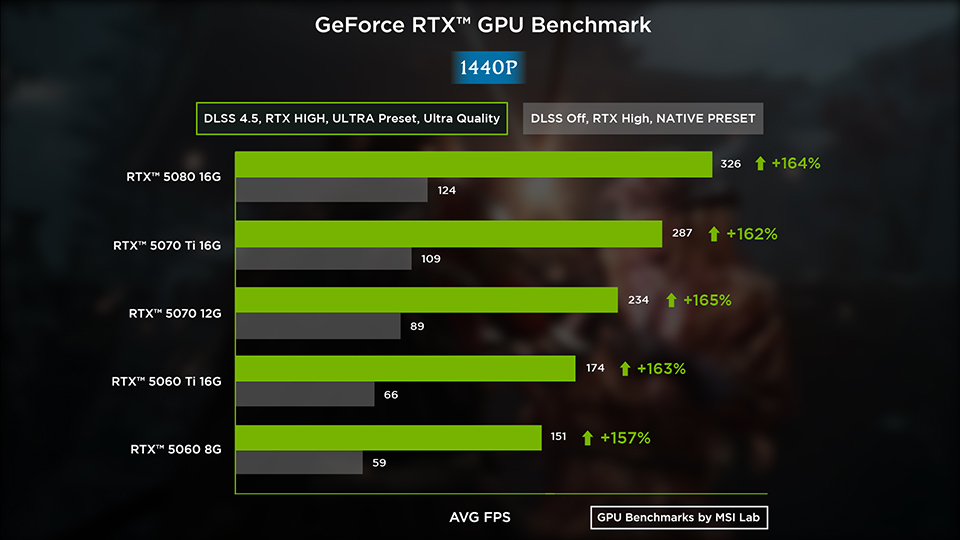
Average FPS at 2560×1440 on the Ultra preset with ray tracing High. Grey bars are native rendering, green bars add DLSS Quality mode with 4x frame interpolation. Even the slowest card here, the RTX 5060 8G, averages 58.9 FPS natively and 151.4 FPS with DLSS, and the DLSS gain holds within a narrow +157% to +165% band across the whole lineup.
Onimusha: Way of the Sword GPU Benchmarks for 4K: Maximum Fidelity with Full Ray Tracing
4K on the Ultra Preset
Average FPS and VRAM allocation at 3840×2160 on the Ultra preset, ray tracing High
Graphics card
DLSS Off
(Avg. FPS)
(Avg. FPS)
DLSS On
(Avg. FPS)
(Avg. FPS)
DLSS Off
VRAM (GB)
VRAM (GB)
DLSS On
VRAM (GB)
VRAM (GB)
RTX 5080 16G
74.2
242.2
9.2
10.1
RTX 5070 Ti 16G
64.6
209.8
9.1
10.1
RTX 5070 12G
50.0
166.0
8.9
9.9
RTX 5060 Ti 16G
36.6
121.2
8.9
10.1
RTX 5060 8G
35.0
84.8
7.8
7.8
At 4K on the Ultra preset with ray tracing pushed to High, two of the five cards clear 60 FPS without any upscaling at all: the RTX 5080 at 74.2 FPS and the RTX 5070 Ti at 64.6 FPS. The latter only just makes it, but it is the more accessible of the two 4K-capable options here. The RTX 5070 falls 10 FPS short at 50.0 FPS native, reaching 166.0 FPS with DLSS on. The two RTX 5060-class cards were not built for 4K Ultra, at 36.6 and 35.0 FPS native.
DLSS gains are also largest at 4K, where the four cards with enough memory all land between +225% and +232%. The one exception is the RTX 5060 8G at +143% — and its VRAM allocation sits at 7.8 GB whether DLSS is off or on, while the other four rise to 9.9–10.1 GB. The cause is an 8GB memory ceiling rather than a shortfall in compute.
4K on the Medium Preset
Average FPS and VRAM allocation at 3840×2160 on the Medium preset, ray tracing High
Graphics card
DLSS Off
(Avg. FPS)
(Avg. FPS)
DLSS On
(Avg. FPS)
(Avg. FPS)
DLSS Off
VRAM (GB)
VRAM (GB)
DLSS On
VRAM (GB)
VRAM (GB)
RTX 5080 16G
89.8
265.0
8.3
9.1
RTX 5070 Ti 16G
78.0
230.7
8.3
9.1
RTX 5070 12G
61.2
183.0
7.9
8.6
RTX 5060 Ti 16G
44.6
134.1
8.2
9.1
RTX 5060 8G
40.3
117.8
7.7
7.8
Medium recovers less at 4K than it does at lower resolutions. All five cards gain between 15.2% and 22.5% — consistent, but not enough: the RTX 5060 Ti goes from 36.6 to 44.6 FPS and the RTX 5060 from 35.0 to 40.3 FPS, both still under 60. At 4K, changing the preset does not rescue a mid-range card; changing the resolution does — that same RTX 5060 goes from 35.0 to 58.9 FPS moving from 4K to 1440p, a 68.5% gain, more than three times what the preset drop delivers.
Medium does relieve the 8GB memory pressure, though: the RTX 5060's DLSS gain climbs from +143% on Ultra back to +193%, landing it back in line with the rest of the lineup.
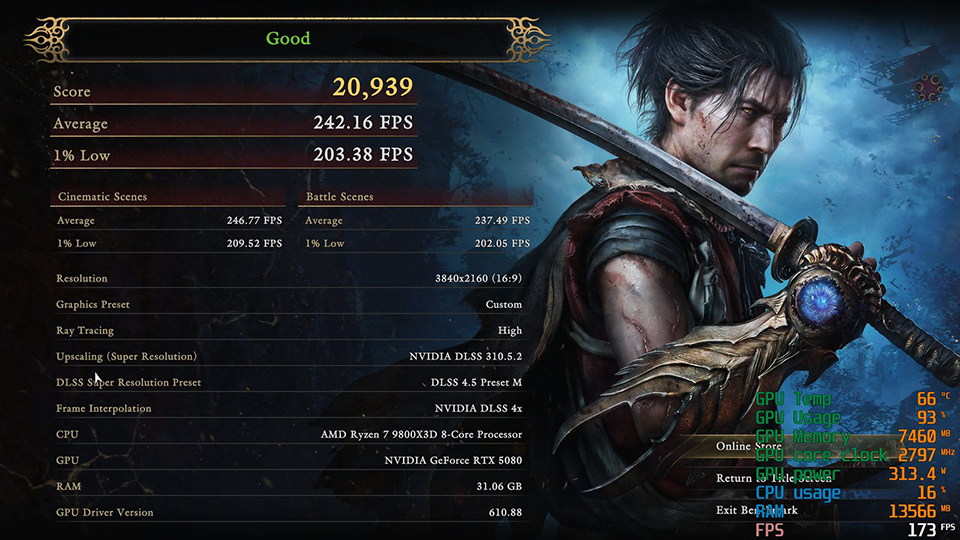
4K, Ultra preset, ray tracing High, DLSS Quality mode and 4x frame interpolation — MSI GeForce RTX 5080 16G averages 242.16 FPS. Note the Score of 20,939, lower than the same card's 25,856 running natively.
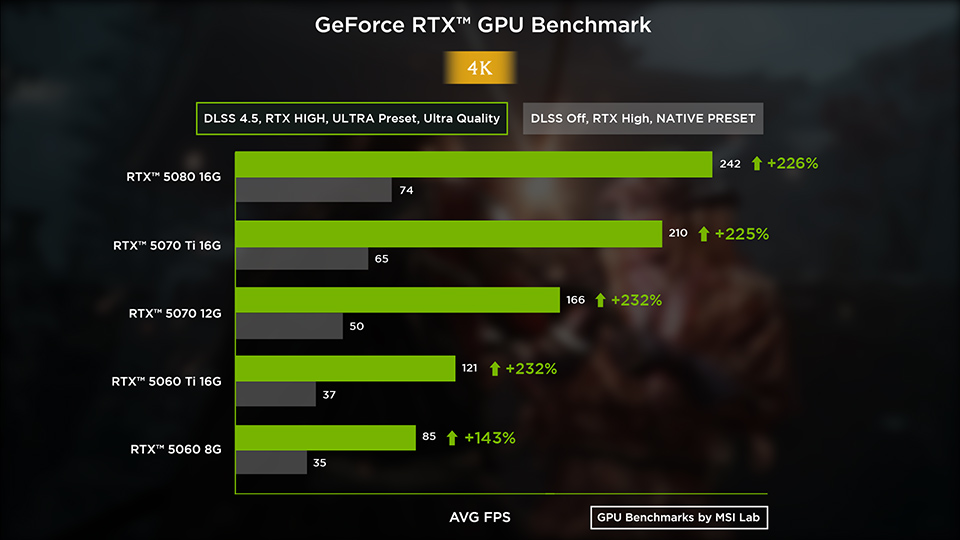
Average FPS at 3840×2160 on the Ultra preset with ray tracing High. Only the RTX 5080 at 74.2 FPS and the RTX 5070 Ti at 64.6 FPS clear 60 FPS without upscaling. The RTX 5060 8G is the one card that breaks the pattern on the green bars, at +143% where the other four gain +225% or more — its 8GB is full before frame interpolation gets its buffers.
1% Lows and Frame Consistency: Does 4x Frame Interpolation Actually Feel Smoother?
Yes — and by more than the averages suggest, but only on cards with enough memory. Running natively, all five cards hold their 1% low at roughly 66% to 70% of their average. Switch on DLSS Quality mode with 4x frame interpolation and four of them rise to between 81.6% and 85.6%. Generated frames are not just raising the average; they are flattening the frame times as well.
Average FPS and 1% lows at 3840×2160 on the Ultra preset, ray tracing High — read off the in-game benchmark result screens
Graphics card
DLSS Off
Avg.
Avg.
DLSS Off
1% Low
1% Low
DLSS On
Avg.
Avg.
DLSS On
1% Low ÷ Avg.
1% Low ÷ Avg.
RTX 5080 16G
74.22
49.67
242.16
84.0%
RTX 5070 Ti 16G
64.56
45.33
209.75
81.6%
RTX 5070 12G
49.97
34.64
166.02
85.6%
RTX 5060 Ti 16G
36.55
24.03
121.17
84.6%
RTX 5060 8G
34.96
18.30
84.80
63.8%
The RTX 5060 8G is the outlier in both columns. Natively at 4K Ultra its 1% low is only 52.3% of its average, where the other four run 65.7% to 70.2%. With DLSS on it climbs to 63.8%, while every other card passes 81%. This is the second independent piece of evidence for the conclusion in the VRAM section: the constraint is capacity, not compute.
The in-game benchmark does not count generated frames as performance either. Alongside the frame rates it awards a Score — and that Score drops when you enable DLSS. The RTX 5080 scores 25,856 natively at 4K Ultra; with DLSS Quality mode and 4x frame interpolation its average frame rate more than triples, yet the Score falls to 20,939, down 19.0%. At 1080p Ultra the effect is larger still, from 55,104 to 32,275. Capcom has not published the formula, but the direction is unambiguous: it discounts the upscaled and generated portion. Capcom’s own scoring therefore separates rendered frames from generated ones, exactly as the DLSS Off and DLSS On columns do.
The verdict the game prints after each run tells the same story. At 4K Ultra with DLSS on, both the RTX 5060 8G and the RTX 5060 Ti 16G are labelled "Setting changes recommended", even though their averages are 84.80 and 121.17 FPS respectively. The RTX 5080 on the same settings is labelled Good — while natively it earns Excellent.
We did not measure input latency. 1% lows describe frame consistency; how the game feels in the hand needs PC Latency or a Reflex Analyzer to answer properly, and this article does not take a position on it.
Onimusha: Way of the Sword GPU Power Draw and Performance per Watt
Contrary to most DLSS testing, power draw in this game goes slightly up when you enable it. The RTX 5080 rises from 261.4 W to 297.8 W at 1080p Medium, an extra 36.4 W. Frame interpolation needs additional Tensor Core work, and the rendering load it saves is cancelled out by the generation load it adds.
GPU power draw in watts, DLSS off / DLSS on, at three test points
Graphics card
4K Ultra
Off / On
Off / On
1440p Ultra
Off / On
Off / On
1080p Medium
Off / On
Off / On
RTX 5080 16G
330.8 / 331.8 W
307.9 / 311.1 W
261.4 / 297.8 W
RTX 5070 Ti 16G
287.8 / 285.8 W
268.1 / 274.0 W
231.1 / 261.9 W
RTX 5070 12G
230.9 / 233.6 W
215.6 / 228.2 W
196.8 / 214.5 W
RTX 5060 Ti 16G
160.0 / 167.5 W
152.7 / 159.1 W
138.4 / 155.1 W
RTX 5060 8G
146.7 / 152.2 W
137.7 / 144.8 W
127.8 / 138.8 W
At 4K Ultra, where the GPU is saturated anyway, the two figures are within about 1 W of each other; the lighter the load, the more visible frame interpolation's overhead becomes as a share of the total. On performance per watt, the RTX 5060 Ti leads natively at 1440p Ultra (66.1 FPS ÷ 152.7 W = 0.43 FPS/W) against 0.40 FPS/W on the RTX 5080. Mid-range cards keep their efficiency advantage; what they give up is the performance ceiling.
Is 8GB of VRAM Enough for Onimusha: Way of the Sword?
Onimusha: Way of the Sword allocates roughly 8.9–9.2 GB of VRAM at 4K on the Ultra preset with upscaling off, rising to 9.9–10.1 GB once DLSS is on. That direction is the opposite of most games — normally rendering at a lower internal resolution saves memory, but 4x frame interpolation needs extra buffers to hold frames, and the net result is an increase. At 1440p the peak is 9.1 GB, and at 1080p it is also 9.1 GB.
Allocation is not the same as need. The VRAM figures in the tables above are allocation: how much memory the game reserves, not necessarily how much it actively requires. On a card with headroom, allocation usually runs above true demand. On a card already at its limit, the figure runs below what the game wants — because there is no more to give.
Why the RTX 5060 8G Behaves Differently at 4K
At 4K Ultra the RTX 5060 8G is operating at its own ceiling. It allocates 7,974 MB with DLSS off and only 58 MB more — 8,032 MB — with DLSS on. Not because it needs less than the others, but because once the driver and the desktop have taken their share, that is very nearly all it has.
The consequence shows up in the DLSS gains. In the same 4K Ultra scene the other four cards gain +226%, +225%, +232% and +232%, a consistent trend; the RTX 5060 gains only +143%. Frame interpolation needs memory of its own to buffer frames, and when capacity is already exhausted, that cost comes straight out of the rendering budget.
The same-tier comparison isolates the variable: natively at 4K Ultra the RTX 5060 (35.0 FPS) and the RTX 5060 Ti (36.6 FPS) are only 4.4% apart, so their rendering ability is close. Turn DLSS on and the gap widens to 30.0% (84.8 against 121.2 FPS). Compute separates them by 4.4%; memory capacity separates them by 30.0%.
The 1% lows show the same ceiling. Natively at 4K Ultra the RTX 5060's 1% low is only 52.3% of its average, against 65.7% to 70.2% on the other four; with DLSS on it reaches 63.8% while the rest all pass 81%. A card at its memory ceiling is not just slower — its frame delivery is less even too.
This bottleneck only appears at 4K Ultra. Drop the preset to Medium and the RTX 5060's gain returns to +193%, back inside the normal band; at 1440p and 1080p the problem does not exist at all. So the answer is: 8GB is enough at 1080p and 1440p, and not enough at 4K Ultra.
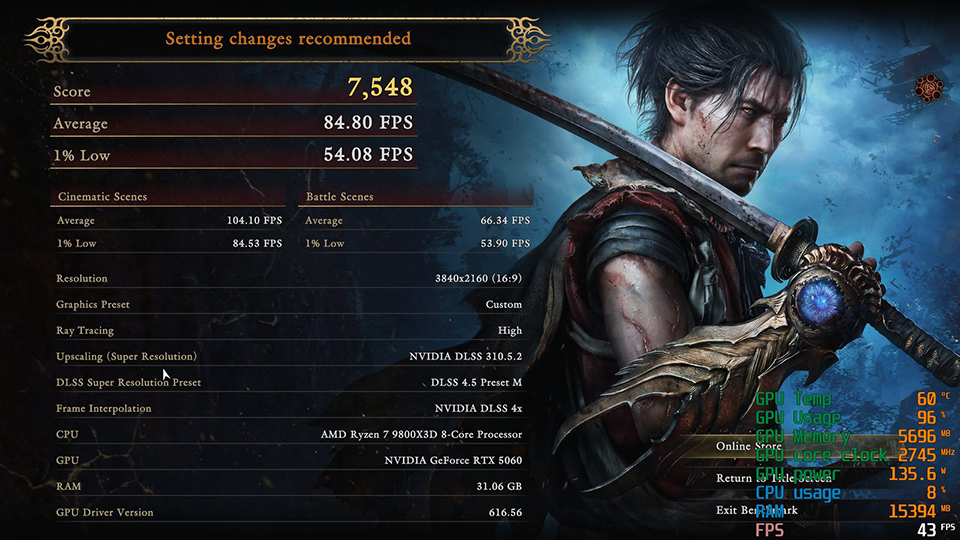
The same 4K Ultra settings on the MSI GeForce RTX 5060 8G with DLSS on — 84.80 FPS average, but only a 54.08 FPS 1% low, and the game's own verdict is "Setting changes recommended". 8GB is the ceiling here.
What Graphics Card Do You Need for Onimusha: Way of the Sword?
By resolution: 4K players want the headroom of the RTX 5080 or the RTX 5070 Ti, the only two cards that clear 60 FPS natively on the Ultra preset. At 1440p the value pick is the RTX 5070 12G, with a comfortable 88.6 FPS native on Ultra; a step further down, the RTX 5060 Ti 16G also clears the line at 66.1 FPS, and its 16GB keeps it clear of the 4K ceiling. At 1080p the RTX 5060 8G is the best buy, where 83.6 FPS native is already plenty.
The Best GPU for Onimusha: Way of the Sword — RTX 5070 12G
All things considered, the MSI GeForce RTX 5070 12G strikes the best balance of performance, features and price. It delivers 88.6 FPS natively at 1440p on Ultra with ray tracing High — the only card in this lineup with real headroom at the sweet-spot resolution without stepping up to a 4K-class budget — and 234.3 FPS with DLSS Quality mode and 4x frame interpolation. Its 12GB also holds up at 4K Ultra (9.9 GB allocated), which means it does not carry the hard resolution ceiling that the 8GB cards do.
- 4K — MSI GeForce RTX 5080 16G: 74.2 FPS native on Ultra, the only card here with genuine 4K headroom.
- 4K on a budget — MSI GeForce RTX 5070 Ti 16G: 64.6 FPS native, just past 60 — the practical entry point for native 4K.
- 1440p — MSI GeForce RTX 5070 12G: 88.6 FPS native at 1440p Ultra, 234.3 FPS with DLSS.
- 1440p and 1080p all-rounder — MSI GeForce RTX 5060 Ti 16G: 66.1 FPS at 1440p Ultra and 92.5 FPS at 1080p Ultra, with 16GB that stays clear of the 4K ceiling.
- 1080p high refresh — MSI GeForce RTX 5060 8G: 83.6 FPS native at 1080p Ultra. Not recommended for 4K Ultra.
Settings advice: on an RTX 5080 or 5070 Ti at 4K, use Ultra with ray tracing High — it clears 60 FPS natively. On an RTX 5070 or below at 4K, turn on DLSS Quality mode. At 1440p, every RTX 50 card can go straight to Ultra. At 1080p all five have room to spare. If you have an 8GB RTX 5060, aim at 1080p, or 1440p on Medium.
Onimusha: Way of the Sword Performance FAQ
Which MSI graphics card is best for Onimusha: Way of the Sword?
The MSI GeForce RTX 5070 12G is the best all-round pick, at 88.6 FPS natively at 1440p on the Ultra preset with ray tracing High and 234.3 FPS with DLSS Quality mode. For native 4K the MSI GeForce RTX 5080 16G leads at 74.2 FPS, with the MSI GeForce RTX 5070 Ti 16G the more accessible entry point at 64.6 FPS. The MSI GeForce RTX 5060 Ti 16G covers 1440p and 1080p at 66.1 and 92.5 FPS, and the MSI GeForce RTX 5060 8G handles 1080p high-refresh play at 83.6 FPS. All five figures are native, with ray tracing at High.
Can the RTX 5060 run Onimusha: Way of the Sword?
Yes, but it depends on the resolution. The MSI GeForce RTX 5060 8G averages 83.6 FPS natively at 1080p on the Ultra preset with ray tracing High, and 179.4 FPS with DLSS on. At 1440p Ultra it manages 58.9 FPS natively — 1.1 FPS short of 60, which still plays fine in practice. At 4K Ultra it drops to 35.0 FPS native and runs into its 8GB memory ceiling, so we would not recommend it there; the MSI GeForce RTX 5060 Ti 16G is the smallest step up in this lineup that removes that limit.
Is 8GB of VRAM enough for Onimusha: Way of the Sword?
At 1080p and 1440p, yes. At 4K Ultra, no. Cards with more memory allocate 9.9–10.1 GB at 4K Ultra, while the 8GB card tops out at 7.8 GB — which drags its DLSS gain down to +143% against +225% or better on every other card. Drop the preset to Medium and it returns to +193%, and the problem disappears. The three 16GB cards in this test — the MSI GeForce RTX 5080 16G, RTX 5070 Ti 16G and RTX 5060 Ti 16G — never reach that wall at any resolution we measured.
What FPS does the RTX 5080 get at 4K?
The MSI GeForce RTX 5080 16G renders 74.2 FPS natively on the Ultra preset with ray tracing High, 242.2 FPS with DLSS Quality mode and 4x frame interpolation, and 265.0 FPS on Medium with DLSS. Note that the DLSS figures include generated frames.
How much performance does DLSS 4.5 add?
Between +93% and +232% across the five MSI GeForce RTX 50 cards we tested, depending on the card, the resolution and the preset, with the largest gains at 4K. But those figures include 4x frame interpolation — three of every four frames on screen are generated — so they describe smoothness rather than rendering performance.
What are the best settings for Onimusha: Way of the Sword?
For 4K on an MSI GeForce RTX 5080 16G or RTX 5070 Ti 16G, use the Ultra preset with ray tracing High; it clears 60 FPS natively. For 4K on an RTX 5070 or below, enable DLSS Quality mode. For 1440p, every MSI GeForce RTX 50 card in this test can run Ultra directly. At 1080p all five cards have room to spare.
Which resolution is the sweet spot?
1440p. All five MSI GeForce RTX 50 cards we tested reach at least 58.9 FPS natively on the Ultra preset with ray tracing High, and all five pass 150 FPS with DLSS enabled. The MSI GeForce RTX 5070 12G is our pick at this resolution, at 88.6 FPS native.
What are the PC system requirements for Onimusha: Way of the Sword?
The game lists Windows 11 as its minimum OS, requires an SSD install, and sets a 16GB memory baseline. Capcom's official PC benchmark tool recommends roughly a GeForce RTX 4060 Ti 16GB or a Radeon RX 6750 XT 12GB to hold 60 FPS at 1080p on maximum settings (official PC benchmark tool notes, 2026). We pushed ray tracing to High on top of that, so our conditions are stricter than the official baseline and the numbers should not be compared directly. Every MSI GeForce RTX 50 card in this test sits above Capcom's recommended tier.
How We Tested
Every figure in this article comes from MSI's own lab. We ran the in-game benchmark built into Onimusha: Way of the Sword on a single fixed platform, swapping only the graphics card between runs, and logged 60 configurations: five cards × three resolutions × two presets × DLSS off and on. Average FPS, 1% lows, Score, board power and VRAM allocation were read from the game's own result and PC Info panels. Ray tracing was held at High for every run. Input latency was not measured.
Author. Evelyn Huang is a technical content specialist at MSI covering GeForce RTX graphics cards and PC gaming performance.
Disclosure. The graphics cards, motherboard, cooler, storage and power supply used in this test are MSI products. Test data is published as measured; no result has been normalised or adjusted.
Last updated September 8, 2026.